You have drawings from the architect, a signed contract, estimates you prepared, and invoices you sent. None of that stops you from finishing a remodel and realizing three change orders never made it to an invoice.
The client asked for additional work. You agreed. The crew completed it. However, the conversation never evolved into a document, and the document never progressed into a bill.
That’s the margin you earned but will never collect. The final invoice has already been sent, and you’re not calling the client back.
Do that three or four times a year and you’ve given away an entire project’s worth of profit. Not because the work was bad, but because the estimate didn’t connect to the change order, and the change order didn’t connect to the invoice.
This isn’t a paperwork problem. It’s a flow problem. The documents exist, but no one has shown you which ones you’re responsible for managing or how they’re supposed to carry information forward as the job changes. As a result, most contractors end up trying to manage that flow across disconnected tools.
This guide shows you which construction documents are essential for every job, which ones you receive from architects and owners versus which ones you create yourself, and how to audit your current system so completed work reliably turns into billed revenue.
What Are Construction Documents
Construction documents are the records that carry a job from “we agreed to this” to “this is what actually happened.”
They go beyond drawings and specifications. Construction documents define scope, price, timing, and payment as a project moves forward, including estimates, schedules, change orders, purchase orders, and invoices.
In practice, these documents are how decisions persist beyond the conversation where they were made. A scope clarification only matters if it appears somewhere that the crew, the budget, and the invoice can reference it. An estimate only protects the margin if it continues to inform purchasing, changes, and billing.
A common issue is that construction documents are created at different points in the project by different people for different purposes. Without clarity on which documents you are responsible for managing and how they relate to one another, it becomes difficult to maintain consistency as the job progresses.
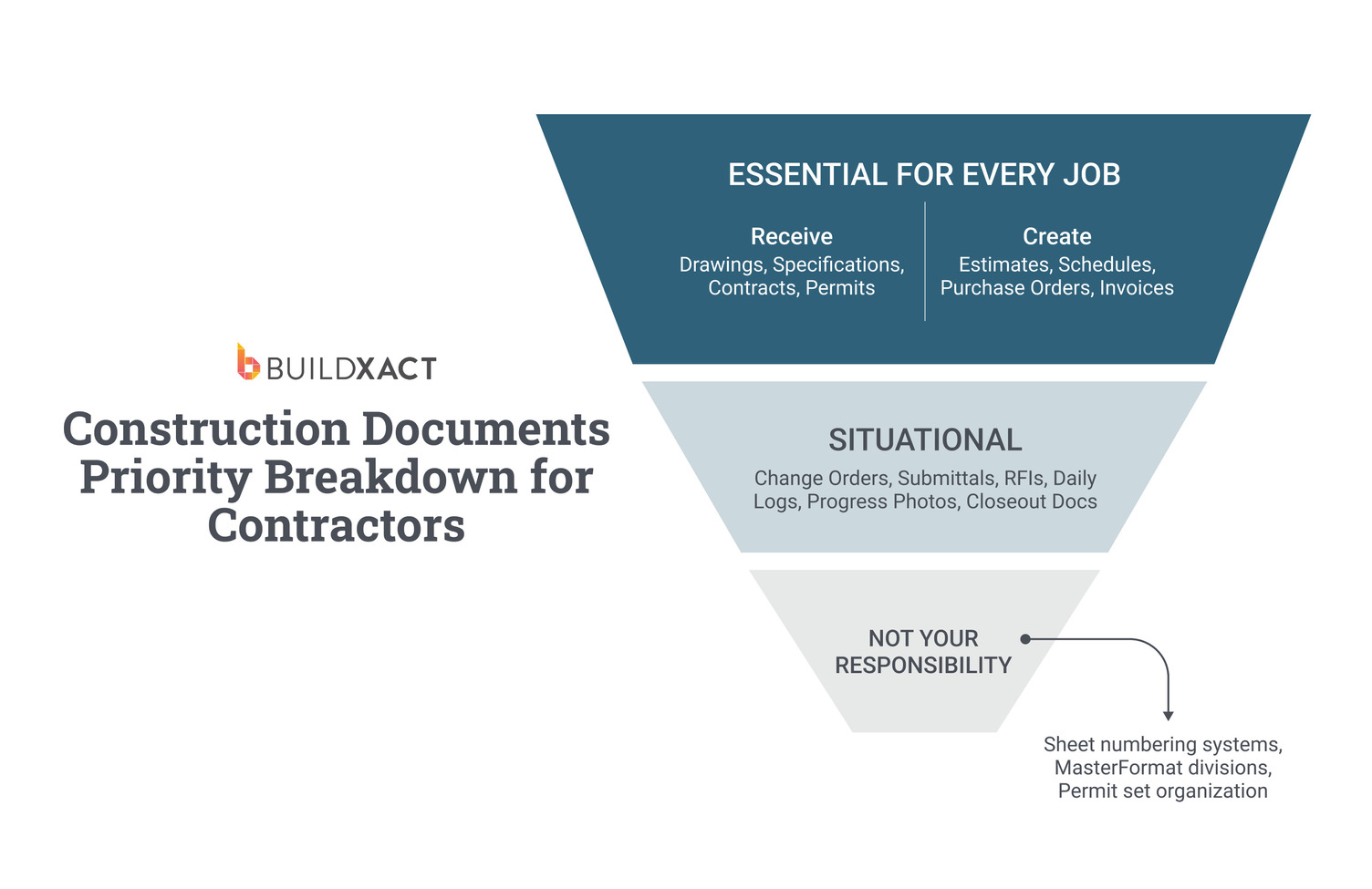
Essential Construction Documents and Who Is Responsible for Creating Them
Construction documents behave differently once work begins, not because of their format, but because of who creates them and who is responsible for maintaining them as the job changes.
Some documents enter the job fully formed. Others only exist if you create them, update them, and carry them forward.
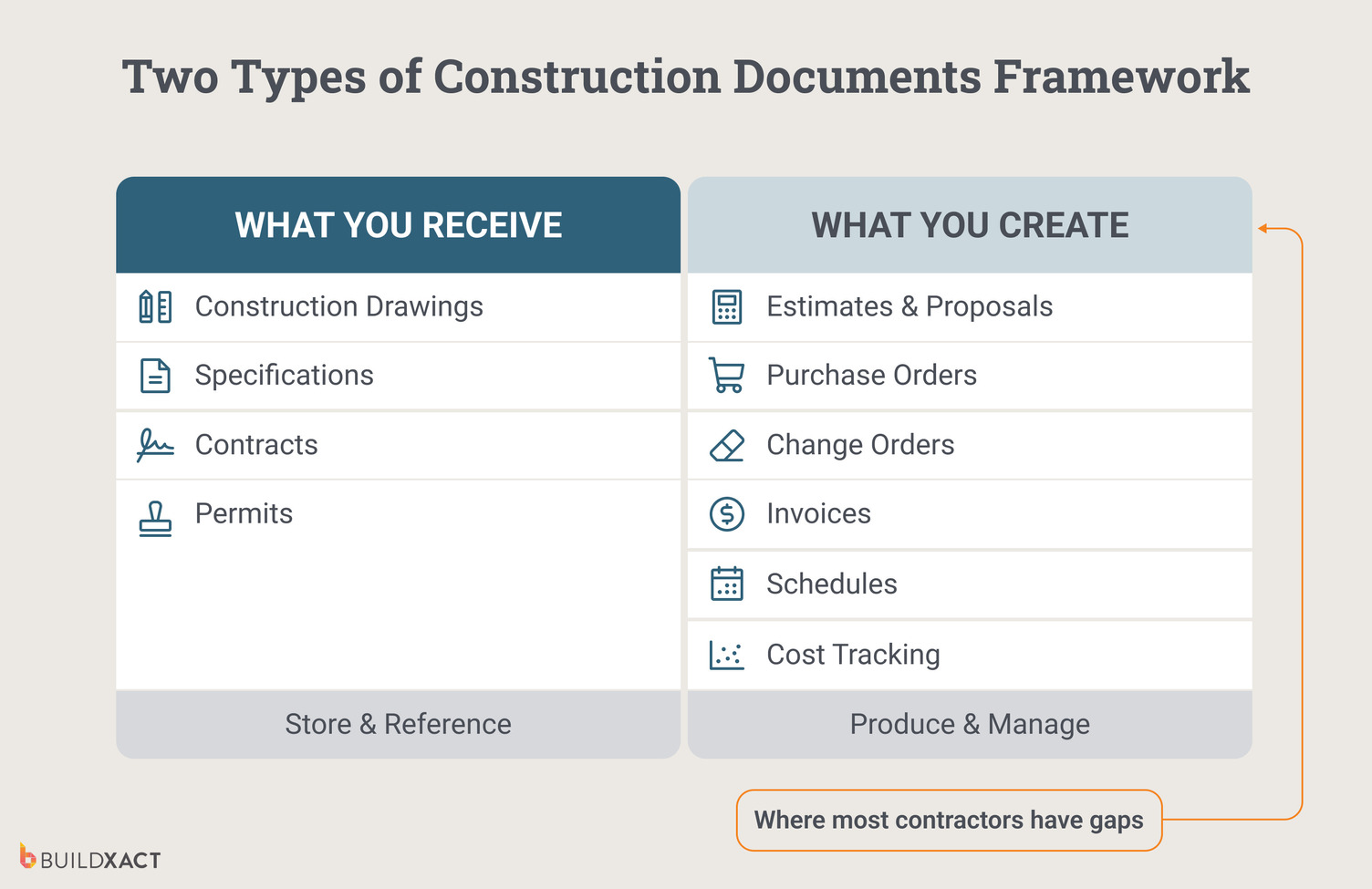
What you receive
Most projects start with documents produced outside your business. Architects issue drawings, designers provide specifications, owners sign contracts, and cities issue permits.
| Document | Source | Your responsibility |
| Construction drawings | Architect / Engineer | Store, reference, build from |
| Specifications | Architect / Spec writer | Reference for materials and methods |
| Contract/agreement | Owner / Client | Sign, store, reference for scope |
| Permits | Jurisdiction | Obtain, post, reference for inspections |
These documents arrive once, with a clear owner. When something is missing or unclear, it’s usually visible immediately, and the responsibility to correct it sits upstream.
You reference these documents throughout the job, but you don’t recreate or maintain them as conditions change.
As a result, they tend to remain intact.
What you create
The documents that shape the margin do not arrive ready-made.
Estimates, purchase orders, schedules, change orders, cost tracking, and invoices only exist if you create them and keep them aligned as the job moves.
| Document | Purpose | Your responsibility |
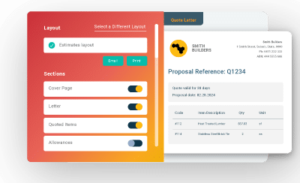
| Estimates/proposals | Win the work | Create, send, follow up |
| Purchase orders | Order materials | Generate from estimate, track delivery |
| Change orders | Capture scope changes | Price, document, get approval, invoice |
| Invoices | Get paid | Generate from progress or milestones, track payment |
| Schedules | Coordinate work | Build, share, update |
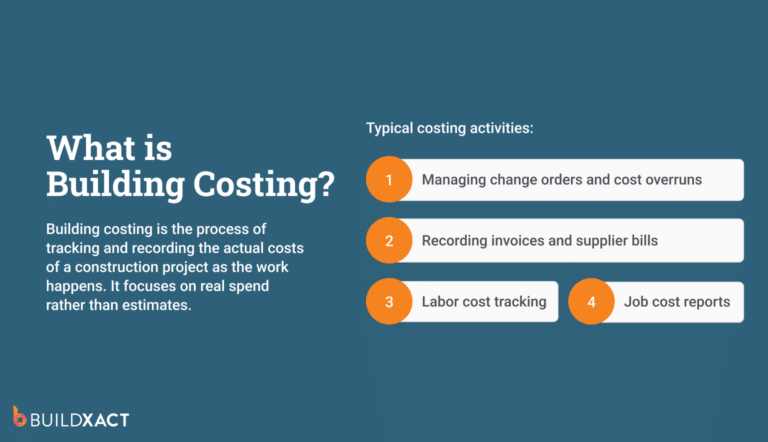
| Cost tracking | Know profitability | Monitor estimate vs actual |
These documents do not have a fixed creation moment. They evolve as the scope changes, materials are ordered, work progresses, and billing occurs. Keeping them aligned is an active responsibility, not a filing task.
Situational documents
Some documents matter more depending on the job. RFIs on complex builds. Daily logs on larger crews. Closeout documents at handoff.
They help manage specific moments, but they do not replace the need to keep core job documents aligned as work progresses.
Why this distinction matters
Documents you receive enter the job once and remain mostly static. Documents you create must change as the job changes.
When those documents stop moving together, the work continues anyway. The consequences do not show up immediately. They surface later, when the job closes, and the numbers no longer line up.
Why having the correct construction documents still isn’t enough
Most builders already have the right documents on paper. You start jobs with drawings, a signed contract, and an estimate you put real thought into. On many projects, you even have change orders written down somewhere.
And yet, jobs still close with margins thinner than expected.
The issue usually isn’t a lack of documentation. It’s how those documents behave once work begins.
The estimate does its work early by helping you win the job. After that, it fades into the background. Purchasing happens separately. Scheduling lives in a spreadsheet or in your head.
Changes get discussed on the site and handled in the moment, so work can continue. Invoicing happens later, once the job feels far enough along or finished.
Each document exists, but each one operates in isolation.
As the job progresses, information doesn’t automatically carry over from one step to the next. Line items get re-entered. Dates get adjusted in email threads. Scope details sit in texts or notes. Every transition depends on someone remembering to move the information forward.
You can stay organized, follow up diligently, and still lose money—not because the work wasn’t documented, but because the documents weren’t designed to stay connected while the job evolved.
This is where documentation problems begin to show their real cost.
Where Documentation Gaps Cost You Money
These problems don’t appear to be documentation failures while a job is running. They seem to be reasonable decisions made under pressure. Each one feels practical in the moment, and the cost only becomes visible after the job is finished, and the numbers don’t add up.
This is how those gaps show up in real jobs.
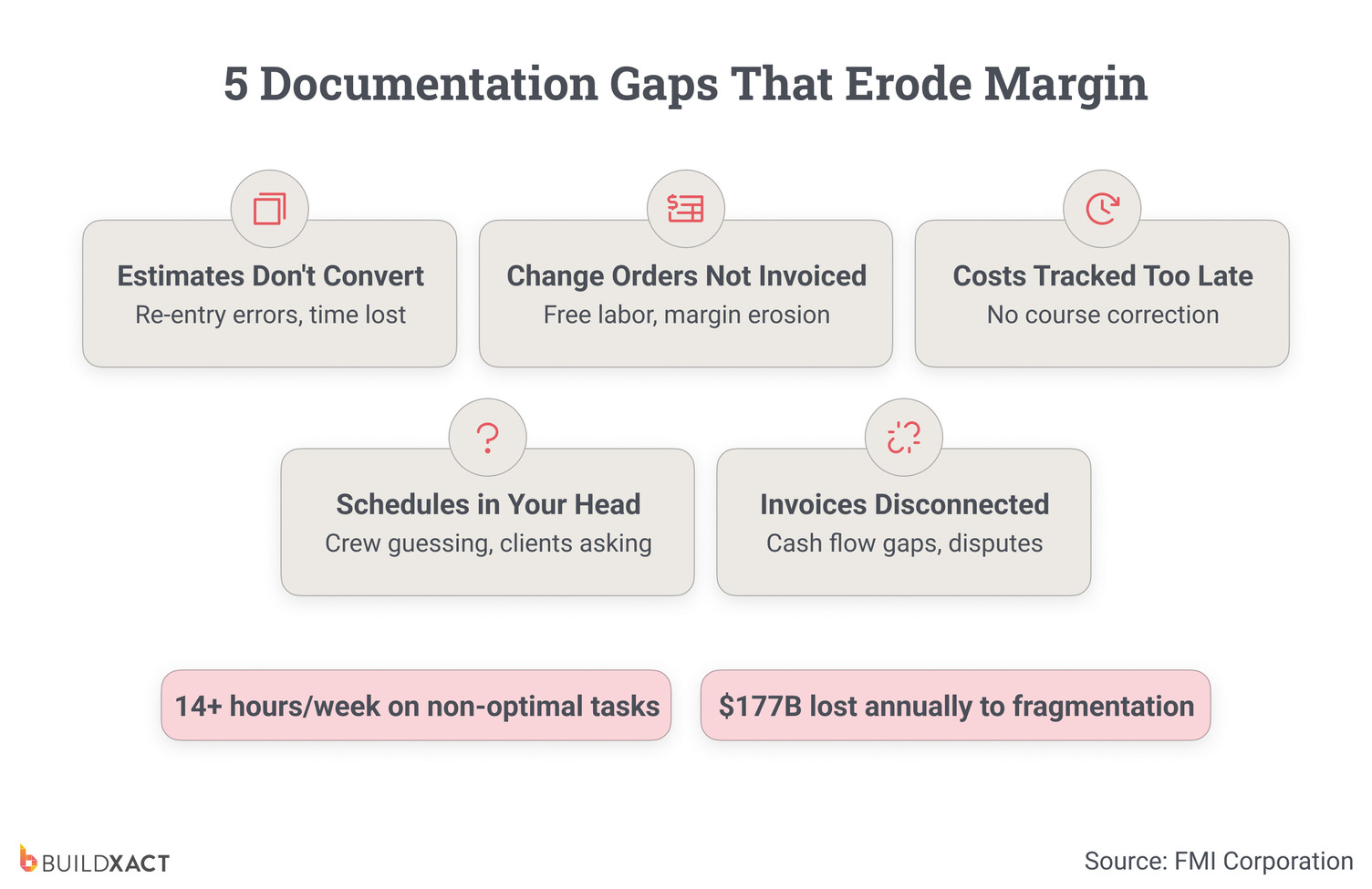
Estimates that don’t flow into purchasing, scheduling, and invoicing
You build an estimate to win the job. Once the client accepts it, you stop treating it as a working document and start using it as a reference. You re-enter the same line items for purchasing, simplify them for scheduling, and rebuild them again for invoicing.
Each re-entry introduces drift. You round quantities and compress scope to whatever feels close enough to keep work moving. None of this feels risky while the job is active. It feels faster than stopping work to rebuild everything properly.
By the time the job finishes, the estimate no longer reflects how the work actually happened. When margins slip, there’s no clean way to tell whether the issue came from pricing, purchasing, sequencing, or execution, because the estimate stopped carrying forward information once the job began.
Change orders that you never invoice for
A client asks for a change on-site, you agree on the scope, and your crew completes the work.
What doesn’t always happen is turning that conversation into a priced, approved change order that flows into the invoice. Sometimes it lives in texts or emails. Sometimes it gets noted and meant to be handled later.
Nothing breaks immediately. The job keeps moving.
The cost shows up at the end, when labor and materials have already been absorbed, and there’s no clean record tying that work to a billable item. That’s unbilled margin, not because the change didn’t exist, but because it never made it through the documentation chain.
Tracking costs after the fact
You know what you estimated and what you invoiced. What you don’t see is what happened between those two points while the job was still active.
You review costs after invoices go out, once you gather receipts and reconcile accounts. By then, the job is closed, and there’s nothing left to adjust.
At that point, discovering the job lost money doesn’t help because you can’t recover the margin.
You can only move on without clear evidence of where the drift occurred.
Schedules and invoices disconnected from reality
The schedule often lives in your head, not with the people doing the work. Crews and subs operate with partial information, show up before the site is ready, or wait for clarification because no shared schedule reflects changes as they happen.
Invoices go out when you remember or when cash flow tightens, not when you hit milestones. That delays billing and creates disputes when charges don’t clearly map to completed work.
Nothing feels broken while the job is active. The work continues. The paperwork catches up later, and that’s where margin leaks hide.
These aren’t edge cases. They repeat across jobs. The next step is figuring out where your own process allows these gaps to form.
How to Audit Your Documentation System
The question is not whether these gaps exist in your business, but where they show up while a job is still active. The only way to see that is to trace how information actually moves from one document to the next.
Estimates and proposals
Pull up your last few accepted estimates.
Look at how you structured them. Check whether you named, grouped, and scoped line items consistently, or whether each estimate reflects a one-off build.
Then follow what happens next.
After the client accepts the estimate, see whether you or someone on your team uses those same line items to create purchase orders, schedules, and job costs. If the estimate stops guiding those steps and someone rebuilds the information later, the estimate no longer drives the job.
The audit question here is simple:
Does the estimate remain the working source for the job, or does it become a static reference once work begins?
Purchase orders
Review how you or your team create purchase orders.
Check whether they pull quantities and descriptions directly from the estimate, or you type them manually. Compare the price you priced with the price you ordered.
Then look at cost visibility.
When material prices change or dealers invoice higher amounts, check whether you see that shift while the job runs or only after accounting closes the loop.
The audit question is about alignment: Does purchasing stay tied to the estimate as the job runs, or does it operate as a separate system?
Change orders
Look at how changes move through the job.
When a client requests a change on-site, identify the next steps. See whether you price the work before the crew starts or after the work finishes. Check whether you capture approval in writing every time or rely on context and memory.
Then trace the change forward.
Once you approve the change, check whether it updates the job budget and invoice automatically, or whether someone will handle billing later.
The audit question here is about follow-through: Does a change move cleanly from billing agreement, or does it rely on memory at any point?
Invoices
Review how you or your team create invoices.
Check whether invoices tie directly to documented progress or milestones, or whether timing depends on reminders, availability, or cash flow pressure.
Then look at visibility during the job.
At any point, check whether you can see what the client owes compared to what the crew has completed, without having to reconstruct the job from notes or memory.
The audit question is about reconstruction: Does invoicing reflect work as it happens, or does it require rebuilding the job after the fact?
Schedules and cost tracking
Identify where you keep the schedule.
Check whether crews and subcontractors reference a shared, current plan or whether you carry the sequence in your head. When dates shift, see whether you update one place or chase people individually.
Then review cost tracking.
Check when you compare estimated costs to actual costs. Notice whether you see drift while the job runs or only after the job closes.
The audit question here is about timing: Can you see deviation early enough to respond, or only once the job is finished?
Reading your results
If you answer “yes” to most of these questions, your system carries information forward. Focus on the remaining handoffs where you still have to assemble information from notes, emails, or texts.
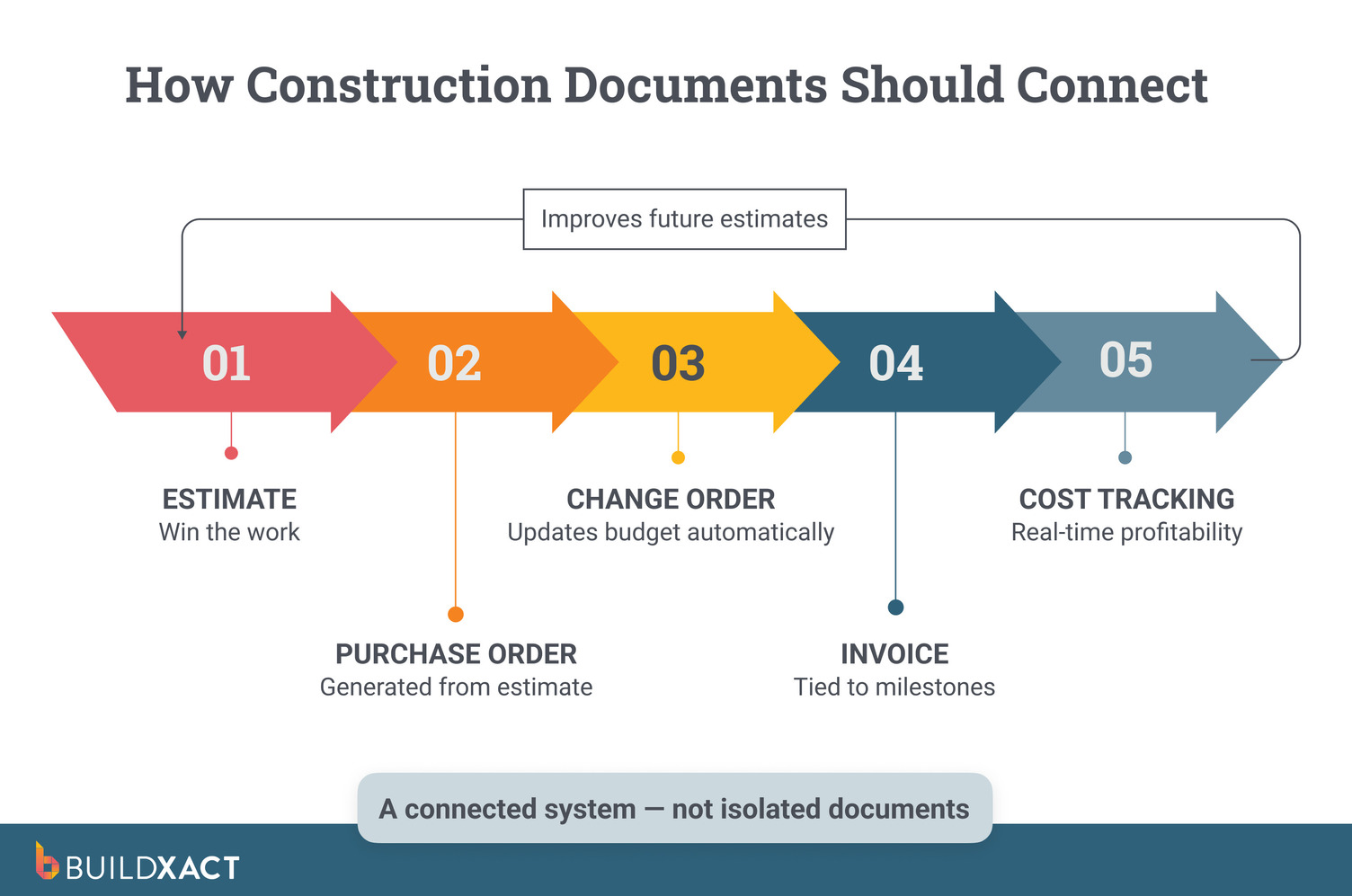
If your answers vary, you create the proper documents but fail to keep them aligned. Start by examining the core sequence: estimate → purchase order → change order → invoice → cost tracking.
If most answers are “no,” start with estimates and invoices. You create both, and they determine whether completed work turns into collected revenue.
Turn Your Existing Construction Documents Into Profit, Not Rework
Most margin loss tied to documentation doesn’t come from missing paperwork. It comes from information that stops moving once the job starts. The estimate wins the work, the change gets discussed, the invoice goes out, but the connections between them break under day-to-day pressure.
Buildxact is designed to keep those connections intact. The estimate you start with drives purchasing. Approved change orders update the job budget as the scope changes.
Invoices are generated directly from completed work and milestones, so finished work becomes billed revenue without re-entry or reconstruction.
If you want to see what that looks like when running your jobs, sign up for a free trial or book a demo using one of your projects. Follow it from estimate to invoice, and see where your current process breaks and what changes when information carries forward.