
There are Gantt charts. And there are Gantt charts. Recognizing the difference can make or break your residential building or remodeling project.
In 2017, researchers at Loughborough University published a study titled “Do Projects Really End Late? On the Shortcomings of the Classical Scheduling Techniques.” Their findings confirm what many builders already suspect: Gantt charts either aren’t keeping pace with their operations, or their operations are outgrowing them.
That’s because static, general-purpose Gantt charts often give overly optimistic timelines and overlook the day-to-day variability of real projects. But residential construction is built on changes, delays, updates, and trade coordination.
This isn’t a call to ditch Gantt charts altogether, but it is a wake-up call. Your scheduling tools are only as effective as the systems and software that power them.
That’s where construction-specific Gantt charts come in. When paired with modern scheduling software, including resource, cost, and crew tracking, they support the real pace and complexity of residential construction.
In this article, we’ll show how home builders like you can use construction Gantt charts more effectively — and how software purpose-built for construction helps keep your timelines realistic, your budgets accurate, and your teams aligned.
What is a Construction Gantt Chart?
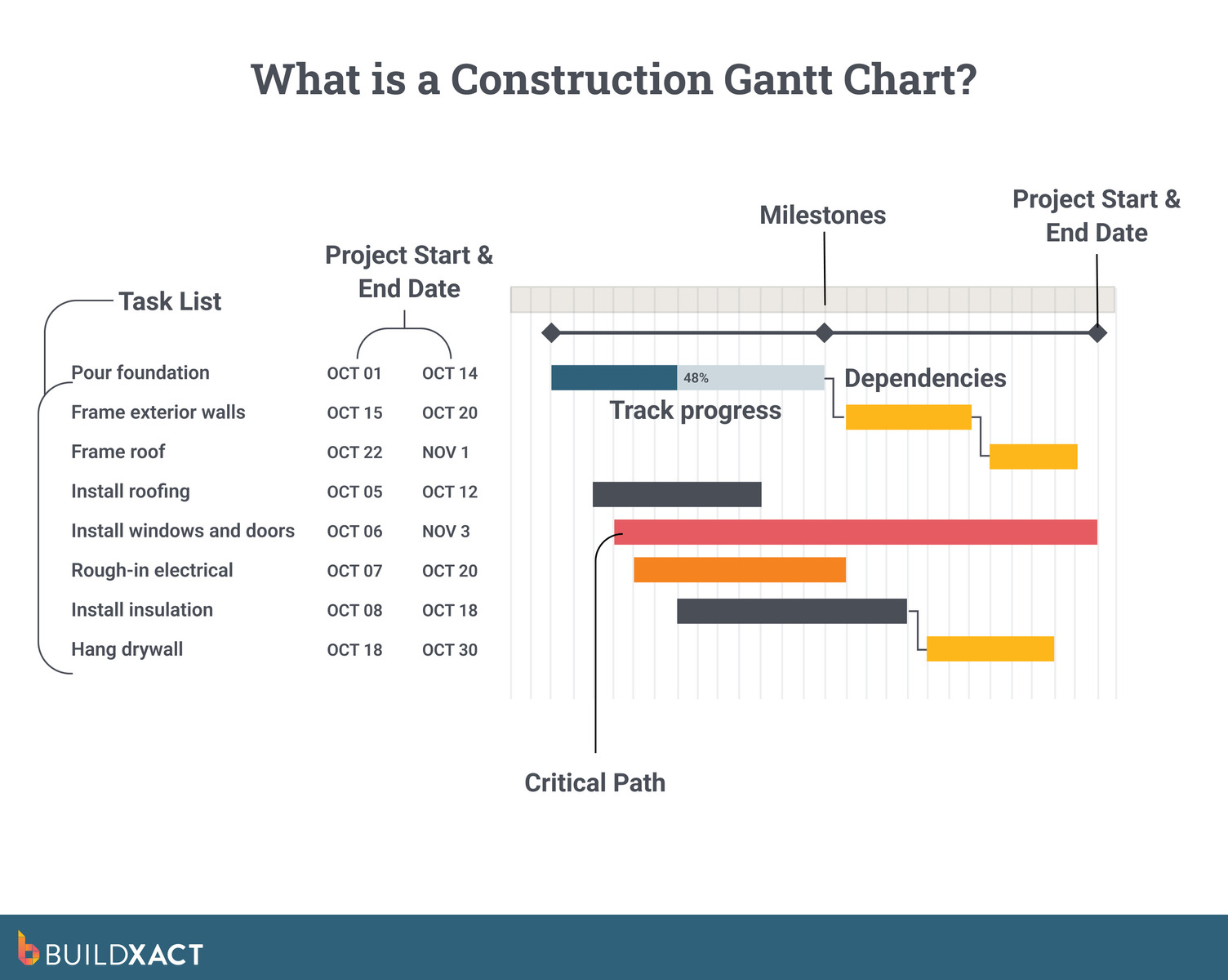
A construction Gantt chart is a visual timeline that shows every major activity in a build, when it happens, and how each task connects to the next.
Instead of trying to keep track of dates across spreadsheets, emails, or handwritten notes, a Gantt chart provides a clear view of the entire project. For small home builders, this matters because most delays come from simple sequencing issues, such as materials ordered too late or tasks overlapping when they shouldn’t.
A construction Gantt chart helps eliminate that confusion. Each bar represents:
- A task
- Its duration
- Its relationship to the rest of the project.
In theory, here’s how it should all work:
- Using a construction Gantt chart, you can see, at a glance, that framing starts after the slab cures, and, based on this, you’ll be able to schedule inspections.
- You’ll also be able to plan subcontractors’ schedules with clarity and in advance, based on what the Gantt chart is reporting about progress and estimated completion times.
- Of course, when timelines shift, these updates should also cascade across the chart, ensuring the entire build remains accurate and on track.
Key components of a construction Gantt chart
Residential construction jobs rely on clear, predictable scheduling. These core elements demonstrate how a well-built construction Gantt chart transforms scattered planning into a structured, easy-to-follow timeline for a residential build.
| Component | What it shows | Why it matters for builders |
| Activities | Every task in the build, broken down clearly | Helps assign responsibilities, track progress, and align crews as the project advances |
| Timeline | Horizontal view of start and end dates | Makes sequencing visible, prevents overlaps, and keeps workflows predictable |
| Durations | Time allocated for each task | Grounds expectations in real workload, avoiding unrealistic schedules and bottlenecks |
| Dependencies / Predecessors | Task relationships and sequencing rules | Prevents stoppages by showing what must happen before work can begin, especially across trades |
| Milestones | Major checkpoints across the schedule | Offers clear progress markers to coordinate subs and track delivery against key project goals |
When these components work together, it’s easier to maintain control over sequencing and gain a stronger understanding of project progress.
Why Are Gantt Charts Used in Residential Construction Projects?
Construction Gantt charts aren’t just helpful—they’re essential for protecting profit margins, managing crews, and preventing costly overruns. Here’s why successful builders rely on them.
#1: They help control project costs
According to a 2023 global study, nearly 85% of construction projects experience cost overruns—many of which are directly tied to scheduling issues, such as unclear sequencing or incomplete task visibility.
To be effective, a construction Gantt chart will need to enable small builders to:
- Track actual vs estimated progress
- Flag scope creep early
- Adjust the plan as often as changes in materials or labor availability necessitate
Because construction Gantt charts lay out every activity in a visual timeline, the visualization and process around their management reduces ambiguity, even across distributed teams, and helps builders catch bottlenecks proactively.
#2: They streamline crew and subcontractor coordination
In a small-to-mid-sized build, you might juggle anywhere from 10 to over 20 trades working on everything from excavation to finishing. When you use construction Gantt charts, you can clearly define each trade’s window, simplifying their scheduling and avoiding costly overlaps.
For example, there’s a clear dependency between slab curing and framing process and you don’t want a situation where a framer is dispatched to a site too early. So, if rain pushes the concrete pour back by 48 hours, a dynamic Gantt chart — especially one backed by construction software — can instantly trigger a rescheduling workflow, minimizing confusion and downtime.
This type of structured coordination facilitates smoother job site handoffs, reduces errors, and ensures tighter adherence to the schedule.
#3: They protect your margins
Margins in residential building are already tight — and they’re only getting tighter.
The National Association of Home Builders (NAHB) 2025 “Cost of Doing Business” study reports a net profit margin of just 8.7% for single‑family builders, which was the highest in decades, yet still narrow given rising material and labor costs.
The same NAHB data shows a gross profit margin of 20.7% in 2023, up from 18.2% in 2020; however, this margin must absorb all overhead, contingencies, schedule delays, and rework risk.
Even in “best‑case” years, residential building margins in the U.S. are tight, which is precisely why tools like well-structured scheduling (via Gantt charts + software) are not luxuries — they’re business-critical safeguards against the missteps that stack up and eat into profit.
A clear, construction-focused Gantt chart layout outlines the organization of a residential project from start to finish. Next, we’ll examine why this scheduling method plays a crucial role in construction.
Steps When Planning a Construction Project Schedule
Every construction project is unique, which means your schedule should be a customized roadmap, not a generic timetable. This involves understanding various scheduling techniques, utilizing project planning tools, and carefully considering the project’s specific materials, contractors, timeline, and scope.
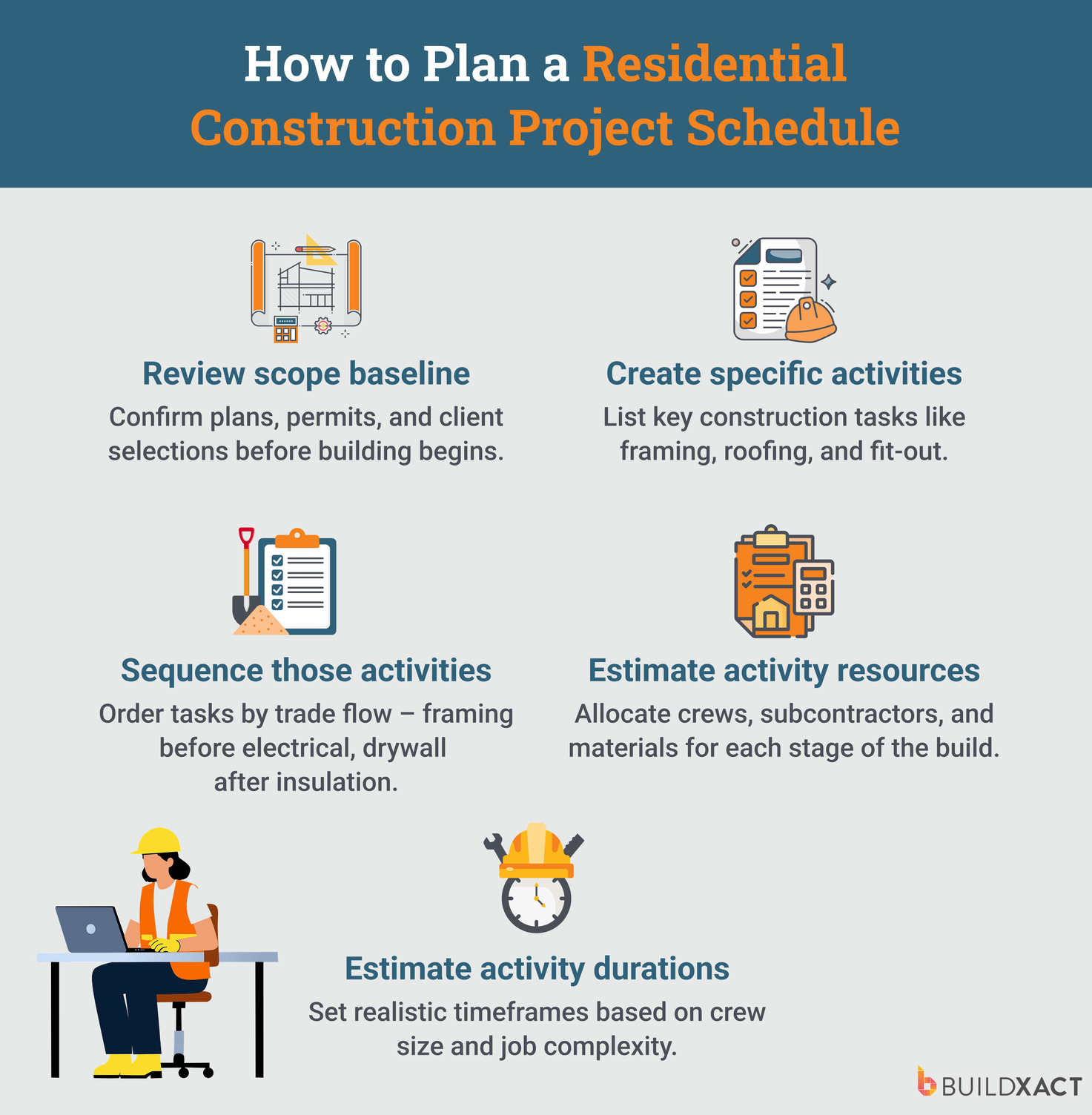
1. Review scope baseline
Review the project’s scope of work (SOW) document before building your schedule to ensure every deliverable, milestone, and objective is accounted for. With Buildxact’s scheduling feature, for example, your specifications document captures the project details you need so your schedule reflects the project at hand.
2. Create specific activities
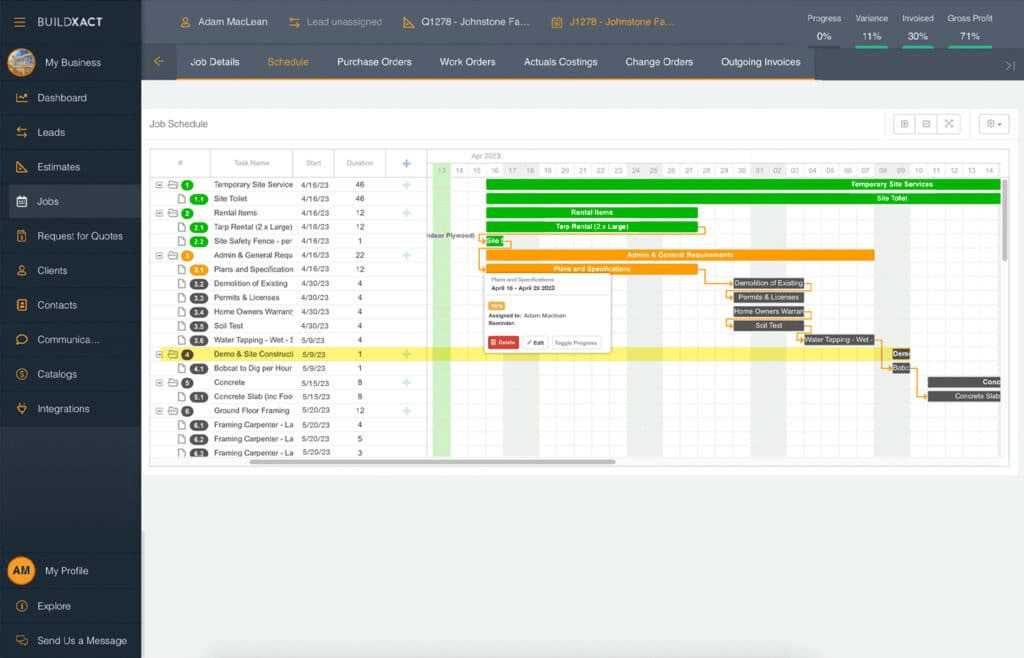
Break major deliverables into smaller, manageable tasks so you have a granular list of the specific actions required for project completion. In Buildxact, tasks created during estimating seamlessly transition to an online scheduling tool that utilizes a Gantt chart view, providing a clean handoff from planning to execution.
3. Sequence those activities
Put tasks in their logical order by identifying dependencies and the critical path. This will help you schedule subcontractors and material deliveries properly. After all, you don’t want the painters to show up if the drywall is still incomplete.
4. Estimate activity resources
Confirm the labor, materials, and equipment needed for each task while factoring in crew availability. With Buildxact, builders can send RFQs and purchase orders on the same platform they use to schedule all the individual tasks, making project planning and team coordination easier.
5. Estimate activity durations
Assign realistic durations to each task by considering workload, potential risks, and past project data. Buildxact’s progress tracking and reusable schedules help builders refine timings and build more accurate plans for similar jobs.
The Gantt Chart Gap: Why Construction Projects Need More Than Static Solutions
While a helpful tool, Gantt charts quickly show their limitations when built and maintained manually in spreadsheets. As projects progress, even small updates become slow, difficult, and error-prone — especially for residential builders managing multiple trades and shifting timelines.
What starts as a simple visual schedule can turn into a disconnected, outdated document that no longer reflects what’s happening on site.
Manual Gantt charts often create challenges, such as:
- Subcontractor coordination issues, which arise because spreadsheet updates aren’t shared in real-time.
- Project delays and cost overruns stemming from outdated timelines, which ultimately conceal slippage and resource conflicts.
- Limited visual oversight, as spreadsheets struggle to make progress, dependencies, or workload clearly visible.
- Communication gaps that occur when each team member relies on their own version of the schedule.
Gantt charts can also become overly detailed and challenging to interpret as projects grow in scale. This complexity means that even minor changes can require significant restructuring of the chart — sometimes spanning multiple pages when managed in a spreadsheet.
And because spreadsheets rely on manual updates, delays or errors in entering new information quickly lead to outdated charts. In a dynamic construction environment, this makes the schedule less effective as a real-time decision-making tool and increases the risk of compounding mistakes.
These limitations highlight why many builders are transitioning to digital scheduling alternatives that automate updates while reducing administrative burdens.
Digital Scheduling: The Modern Way to Schedule and Plan Construction Projects
Construction management software, such as Buildxact, represents a more modern approach to planning construction projects, offering digital scheduling and planning capabilities that surpass those of a manual Gantt chart.
Digital scheduling tools offer real-time updates, dependency visualizations, resource management, and integrated, centralized communication. These capabilities empower teams to handle the complexities of construction projects with greater flexibility and visibility.
“Advancements in technology may help streamline project management, collaboration, and decision-making while reducing delays and costs.”
— 2026 Engineering and Construction Industry Outlook, Deloitte
Moreover, a cloud-based software solution enables everyone involved in a construction project — including project managers, subcontractors, and field crews — to access and update schedules on-site, from a mobile device. This type of transparency ensures everyone involved is on the same page.
Intelligent software platforms also offer real-time dashboards and progress reporting, providing data-driven insights. This enables teams to identify potential bottlenecks early, adjust plans proactively, and enhance future project planning.
Here are some of the key ways digital scheduling addresses common challenges in construction scheduling.
Instant schedule updates
Manual rescheduling forces builders to rewrite timelines and chase down the latest version. Digital scheduling replaces that chaos with drag-and-drop updates and automatic dependency shifts that keep the entire plan accurate in seconds.
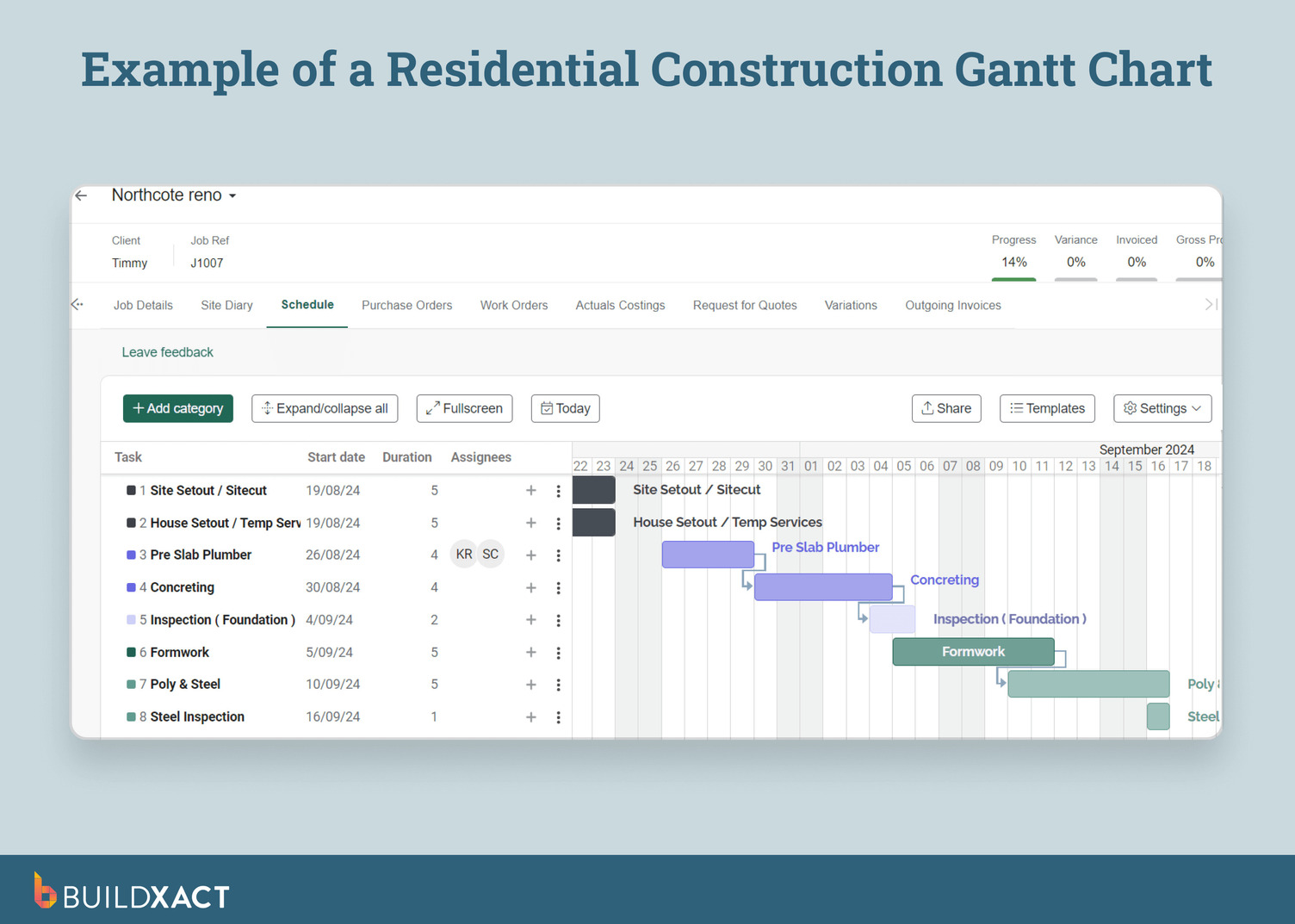
For example, with Buildxact’s simple point-and-click commands, builders can easily create and modify Gantt charts for even the most complex projects. Any modifications and dependencies can be adjusted quickly, keeping the chart up-to-date and reflecting the real-time project.
Streamlined subcontractor coordination
Trades often collide or miss handoffs when everyone works from disconnected schedules. Centralized digital timelines give every subcontractor a clear view of what’s happening next, reducing overlap, downtime, and costly on-site confusion.
Reduced project delays and cost overruns
Outdated spreadsheets hide slippage and missed dependencies until they become expensive problems. Real-time scheduling links tasks, materials, and timelines, allowing issues to be identified early — reducing rework and delays, and protecting margins.
With a residential-focused scheduling tool like Buildxact, small home builders complete 56% more jobs on time each year.
Clear visual project oversight
Static spreadsheets make it hard to see how far along a job actually is. Digital Gantt views provide a clear overview of timelines, dependencies, and milestones, offering builders instant visibility into project health.
Stronger communication across teams
Critical updates disappear when buried in emails or random text threads. A shared digital schedule keeps builders, clients, and site teams working on the same page, ensuring everyone works from a single real-time project plan.
A study investigating the impact of various IT tools on project management efficiency found that solutions like construction project management software significantly improve project performance by enhancing team communication and collaboration quality.
Buildxact’s digital document management system stores online project status notes, documents, and plans for easy access.
If you’re curious about construction scheduling software but aren’t sure where to start with identifying the right platform, check out our handy guide, 7 Top Construction Scheduling Software Platforms for Home Builders.
Digital scheduling gives small builders the real-time insights that manual tools lack, creating a more predictable workflow. Next, we’ll examine how software leverages that insight to enable faster and more accurate construction planning.
How to Create a Gantt Chart With Construction Project Scheduling Software
Smart scheduling software enables the creation of Gantt charts quickly, accurately, and repeatably. Instead of wrestling with spreadsheets, builders work from a clean interface where tasks, timelines, and dependencies are created once and update automatically as the job evolves.
With Buildxact, generating a Gantt chart is built into the way you already manage your projects.
- You create or open a job, add your categories and tasks, set start and end dates, and link tasks with either manual or automatic dependencies.
- As you track progress, percentage-complete updates and color-coding keep every task clear.
- Once those details are entered, selecting “Gantt View” instantly converts your schedule into a visual timeline, without any extra setup.
- Every adjustment you make in the schedule flows through to the chart, eliminating manual rework and version chaos.
- And when you need to share the plan, you can export or email the Gantt chart directly from Buildxact.
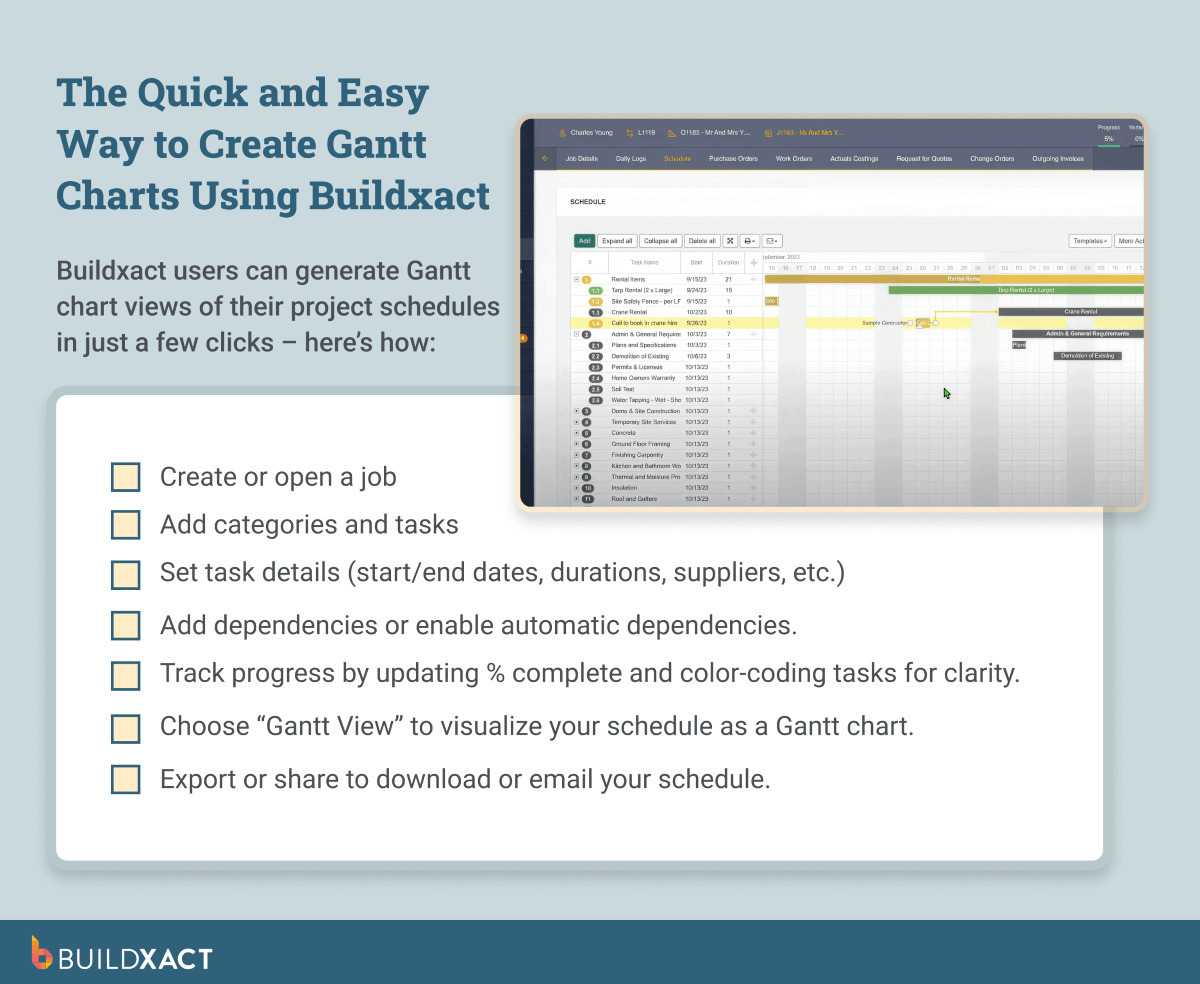
Digital scheduling transforms what used to take hours into a process measured in clicks, providing small builders with a fast and reliable way to plan and communicate every stage of the build.
And the business impact is tangible: builders using Buildxact’s scheduling software nearly double their business revenue in just 18 months.
With your Gantt chart built and updating automatically, the next step is to understand how to strengthen your scheduling further using proven construction-specific best practices.
Best Practices for Construction Gantt Charts
Effective Gantt charts support stronger coordination across the build and give teams the real-time visibility they need to keep projects running to schedule.
The following best practices help small residential builders create schedules that remain accurate and adaptable as projects progress.
Define clear project phases and milestones
Break the build into structured stages with measurable checkpoints so everyone understands what comes next. This clear breakdown makes progress easier to assess and reduces confusion when project timelines shift.
Show task dependencies and critical path
Display how each task connects and which ones determine overall delivery. Mapping dependencies prevents trade clashes, reveals potential bottlenecks, and highlights the tasks that must stay on schedule to keep the project moving.
Keep schedules simple and readable
Focus on essential activities, timelines, and responsibilities rather than cluttering the chart with unnecessary detail. A clean schedule enhances visibility for everyone involved in the project, making updates faster and more reliable.
Update regularly with actual progress
Revise task statuses, durations, and completion percentages as work unfolds. Keeping the chart current ensures that decisions are based on real conditions and data, rather than stale assumptions, thereby reducing unwanted surprises later in the build.
Allocate realistic durations and float
Set achievable timeframes and include buffers for weather delays, material issues, or subcontractor availability. This reduces the risk of overruns and helps maintain momentum in the face of unexpected changes.
Use color coding and visual cues
Apply consistent colors or symbols to identify phases, priority tasks, and status updates. These visual cues make the chart easier to interpret at a glance, helping teams quickly identify what needs attention.
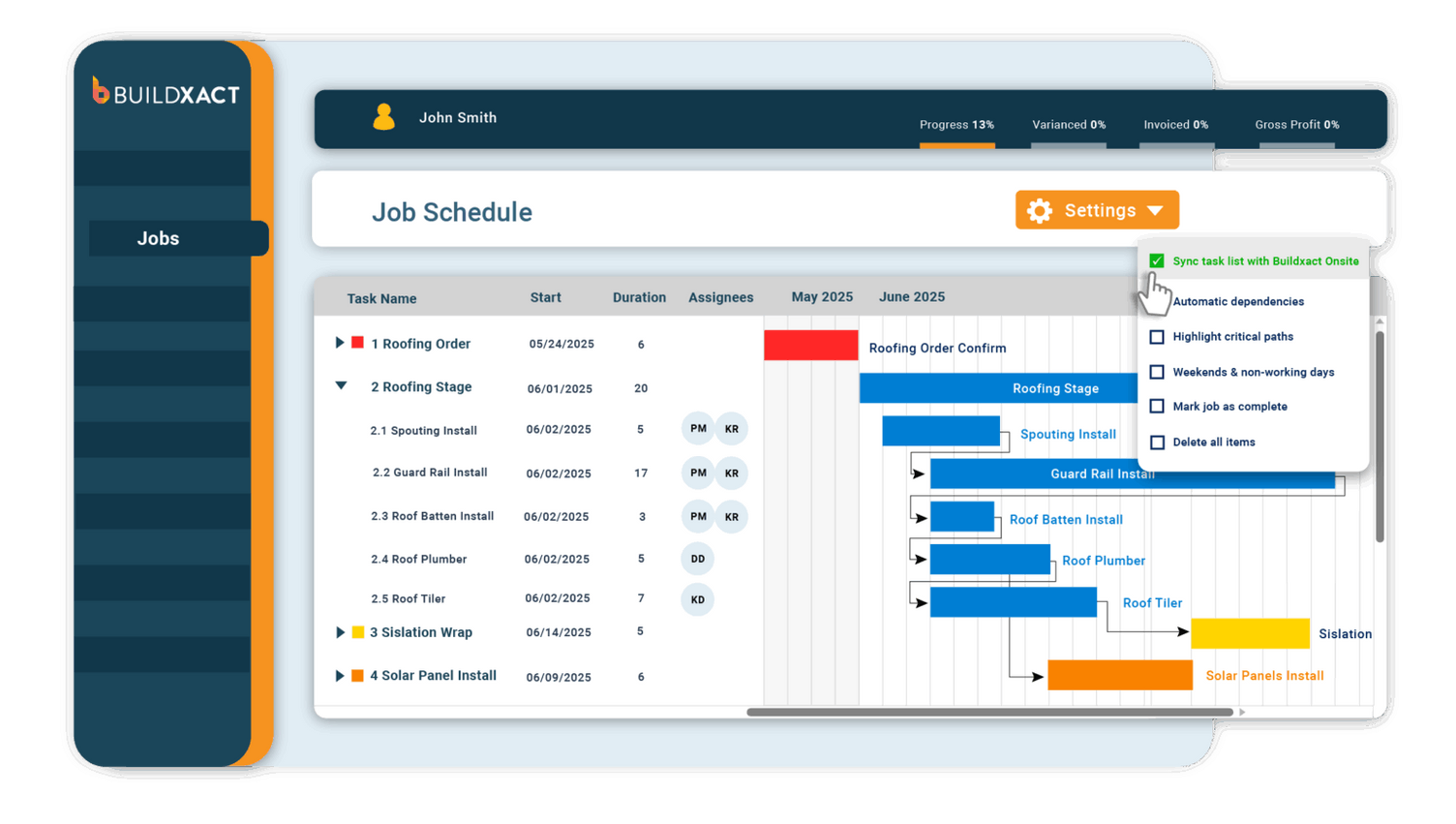
Used consistently, these practices turn Gantt charts into dependable planning tools that support timely delivery and more robust management across residential projects — without the disruptions that cause costly delays and dissatisfied clients.
Keep Your Subs Aligned and Your Projects On Track With Modern Project Scheduling Software
Reliable scheduling is the backbone of smoother subcontractor coordination, clearer timelines, and fewer on-site surprises. When your Gantt charts update automatically, and every sub works from the same plan, the gaps that typically slow jobs down start to disappear.
Buildxact enhances this workflow with connected scheduling tools specifically designed for residential construction. Tasks, dependencies, and timelines remain accurate as the job evolves, providing a schedule your teams can trust and a more straightforward path to on-time delivery.
To discover how Buildxact’s intelligent project scheduling tools can help you complete more jobs on time and within budget, book an interactive demo or start your free 14-day trial today.