

The fastest way to generate a construction cost estimate is to stop rebuilding it: start with an AI-generated first draft, let software measure the plans, pull live dealer pricing, then review the number yourself.
You finish on site, get the kids to bed, and open the spreadsheet. Again. The bathroom you priced last month is in another file; the dealer still has not called back about the tile; and you are not sure the plan measurements you took on Tuesday include the closet.
That’s how a two-hour estimate turns into a week. Every bid starts blank, every price is a phone call, and every missed measurement means another trip. Meanwhile, the homeowner is talking to the builder who answered first, and the material prices you quoted keep moving.
The fix is not typing faster. It’s taking the repetitive work out of each step.
This guide walks through the estimating workflow one step at a time, shows where the hours actually go, and shows how Blu’s Estimate Generator and Takeoff Assistant handle the grunt work while you keep control of the number.
Key Takeaways
- Most estimating time goes to repeat work: rebuilding line items, re-measuring plans and chasing dealer prices.
- Buildxact customers report cutting a bathroom estimate from up to two hours to about 25 minutes, and a whole-house estimate from 10 hours to four.
- Blu’s Estimate Generator can build an editable first-pass estimate in about 30 seconds from a plain-English job description.
- Connected The Home Depot pricing replaces days of dealer phone tag with current prices loaded in seconds.
- Blu is a co-pilot: its first pass is a starting point, and the builder still checks scope, quantities, prices and markup.
Where Do the Hours Go in a Manual Construction Estimate?
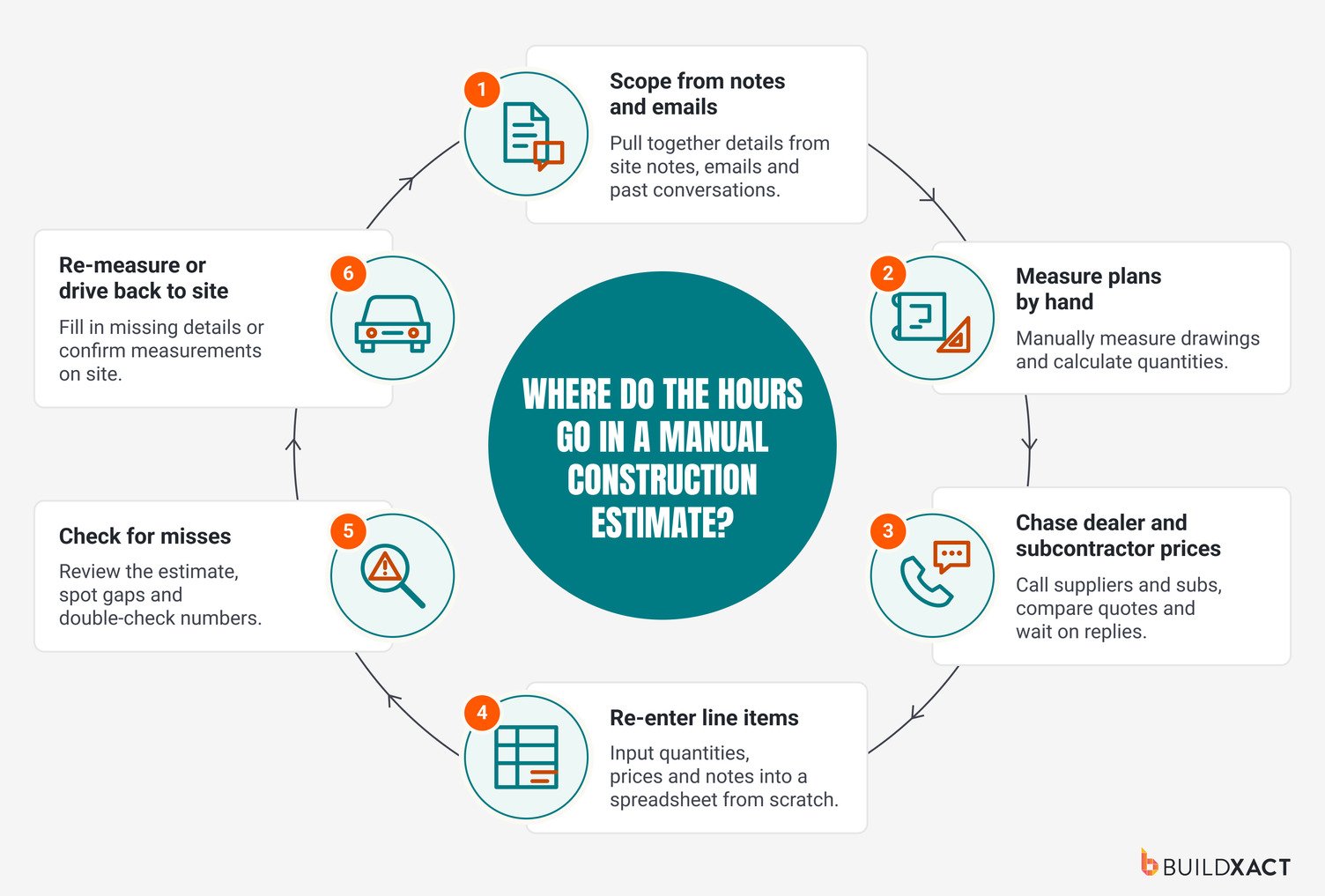
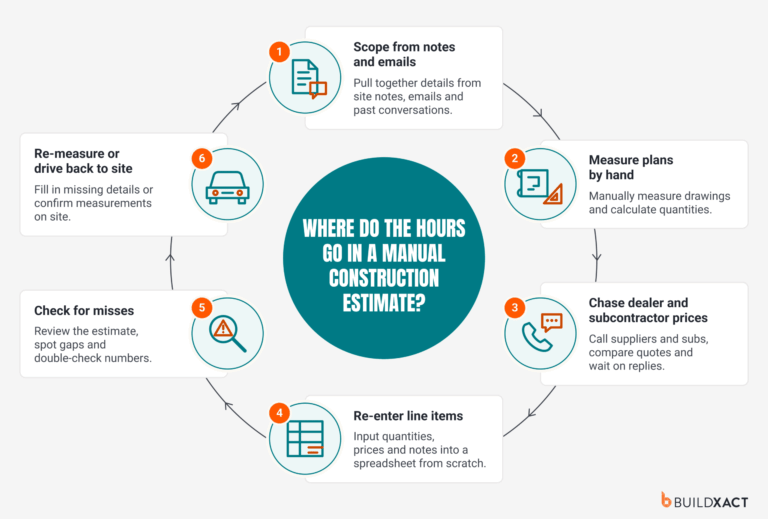
Measuring and adding up materials is the easy part. The hours go to everything around it: homeowner emails, supplier quotes, entering line items. Then the plans change. A revised floor plan means measuring again. A different tile means another call to the supplier. A job like one you’ve priced before means digging through old spreadsheets for the numbers.
Joshua Bradley of BradWay Construction and Restoration was still working on bids at two or three in the morning, building each one from scratch in a spreadsheet even when he’d priced similar jobs before.
Joe Dodson of Dodson Construction had a different problem. After 30 to 40 emails with one homeowner, finding what he’d originally quoted was a job in itself.
What a slow bid costs you
All those extra hours add up, but the bigger concern is what they can cost your business.
The longer it takes to send a quote, the more time the homeowner has to consider another builder. And when you’re waiting days or weeks for supplier prices, there’s a risk that the numbers you eventually send won’t reflect what you’ll actually pay.
Material costs are particularly important here. According to the National Association of Home Builders, residential construction material prices continued to rise in July 2026. If your estimate is based on older prices, you could end up covering the difference out of your margin.
Here’s something worth checking: Look back at your last three estimates. How much time did you spend measuring plans, chasing prices, entering line items and making revisions? Chances are, one or two of those tasks are taking up far more time than they should.
How Do You Scope a Job Without Starting From a Blank Page?
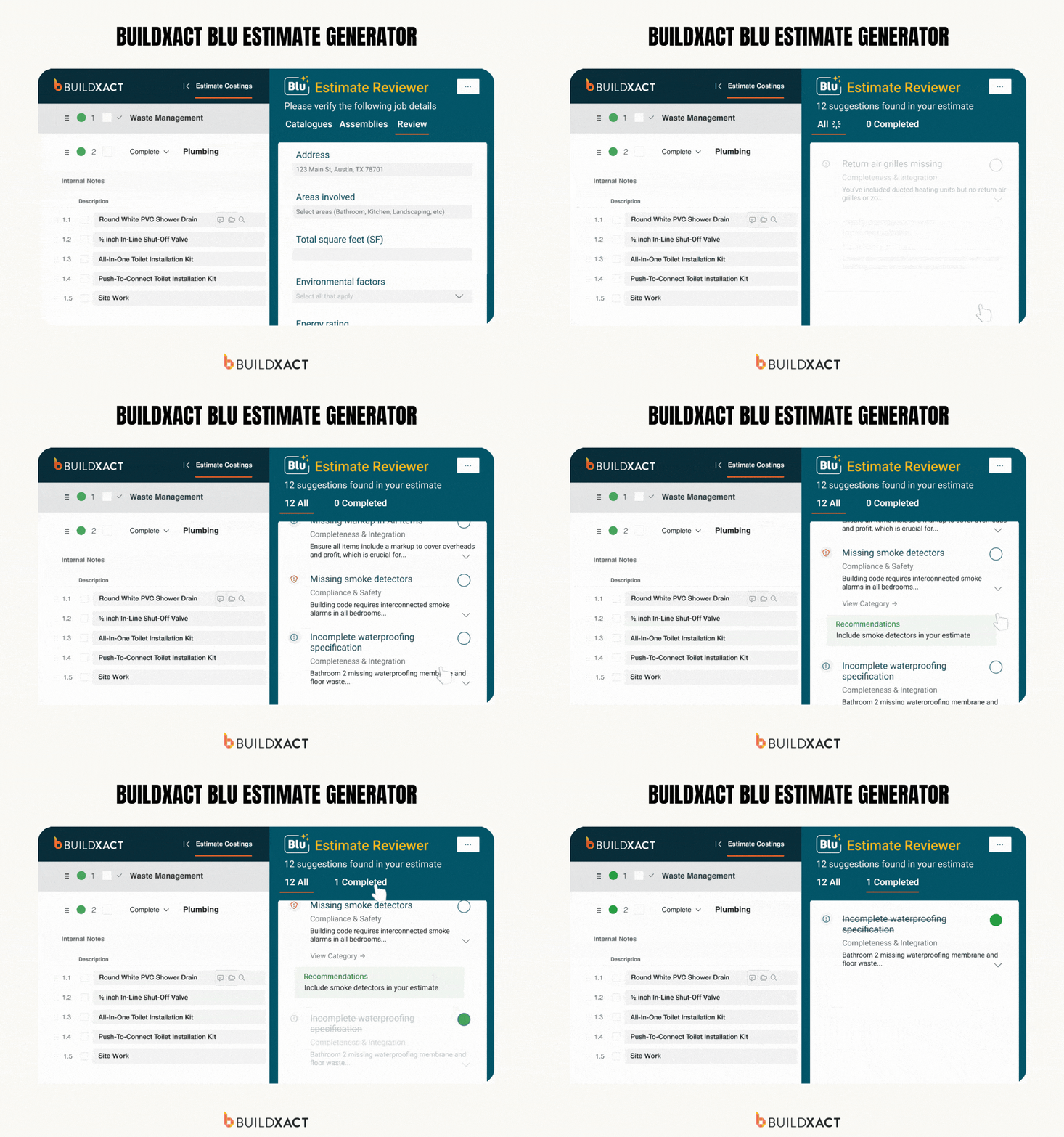
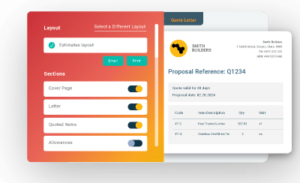
The quickest way to scope a job is to start with a list of the work involved, then build out the materials, labor and quantities. Buildxact’s Blu Estimate Generator gives you a head start by creating a first-pass estimate from a simple job description instead of entering every line item yourself.
Say you’re quoting a bathroom remodel. You enter the project location and describe the work in plain English: remove the existing shower and vanity, install new fixtures, retile the floor and repaint the walls.
Blu uses those details to suggest the tasks, materials, labor and quantities needed for the job. It can generate an editable estimate in as little as 30 seconds, using current material pricing from The Home Depot where available.
Instead of spending your evening building line items, you have a draft you can start checking and adjusting straight away.
One way to see how much time this could save is to run a job you’ve already estimated through Blu. Use the same scope and compare the generated estimate with your original. You’ll quickly see what Blu gets right, what needs adjusting and how much manual entry you can avoid.
Where the first pass still needs you
As your AI assistant, Blu can’t walk the site or speak to the homeowner. It can work from the information you provide, but there are still details you’ll need to check before relying on its numbers.
- Scope: Check that site prep, protection, disposal, permits, subcontractor work, allowances and exclusions are accounted for. Pay particular attention to site conditions that weren’t included in your original description.
- Pricing assumptions: Ensure the suggested materials match the homeowner’s selections, and verify labor requirements and any job-specific costs.
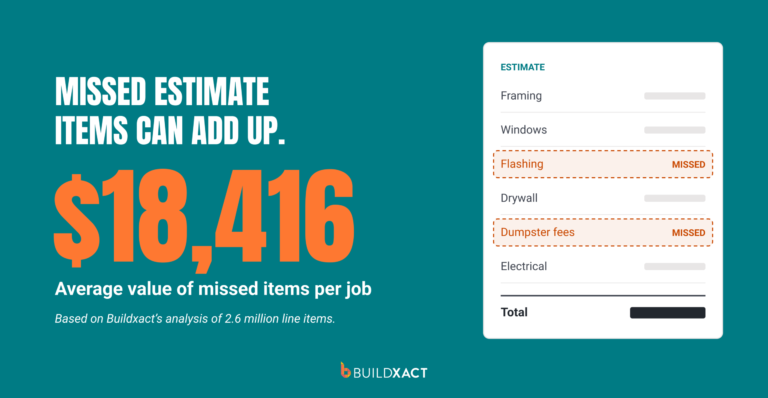
- Potentially missed items: Blu’s Estimate Reviewer can flag items and costs that may have been overlooked, giving you another chance to catch omissions before sending the bid.
Think of Blu as a new hire. It does the groundwork and spots gaps, but it’s your name on the quote. You still need to check its work and any costs left out of the estimate could come straight out of your margin.
How Can You Cut Takeoff Time Without Re-Measuring?
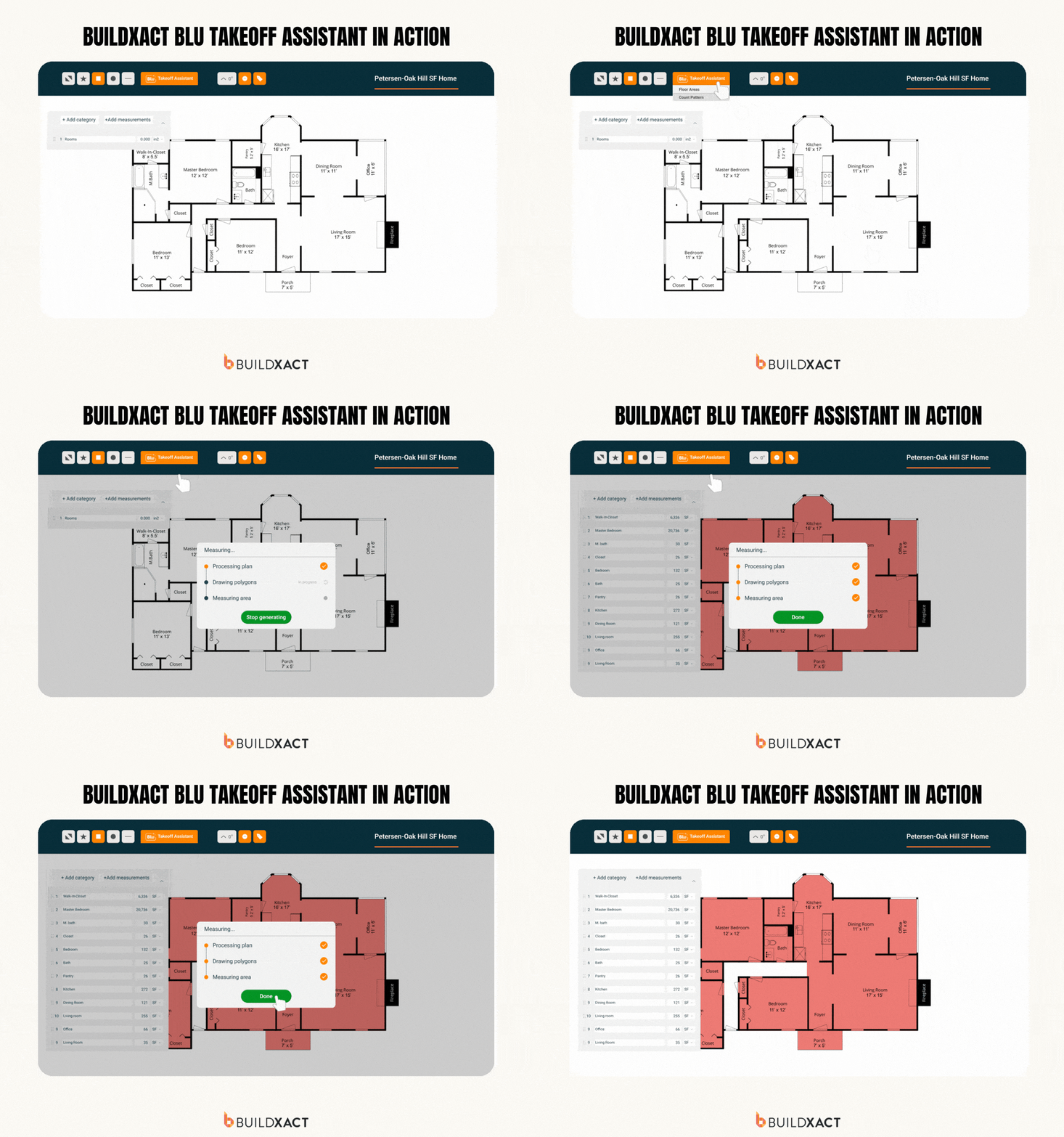
Doing takeoffs manually can take hours, especially on larger jobs. You might measure the same wall three times: once for framing, once for drywall, once for insulation. Then you realize you skipped a room and go back through the plans.
Buildxact’s Blu Takeoff Assistant helps reduce that tedious work.
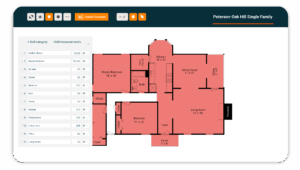
Once you upload your PDF plans into Buildxact, Blu can automatically detect the scale, name the plan pages and measure room areas. You can then review the measurements and use Buildxact’s point-and-click takeoff tools to adjust anything that needs further review. This also means you’re working from the same measurements throughout the estimate.
Buildxact’s takeoff tools can reduce the time spent measuring and counting materials by 65%. That could save you hours across several bids, especially if you’re still doing most of your takeoffs manually.
When to trust the auto-measure and when to check it
Automated takeoffs can speed things up, but a wrong measurement can still throw off your entire estimate. Before using the quantities in your bid, check the following:
- Plan accuracy: Make sure Blu has picked up the correct scale, particularly if the drawings have different scales or have been revised. Check irregular areas and any missing dimensions manually.
- Quantities: Review the measured areas, material counts and waste factors. For example, 200 square feet of flooring doesn’t necessarily mean you only need to order 200 square feet of material.
- Estimate line items: Check that the measurements are feeding into the right materials and labor costs. An accurate wall measurement won’t help if you’ve left out the insulation or underestimated the labor required to install it.
How Do You Stop Waiting on Dealer Pricing?
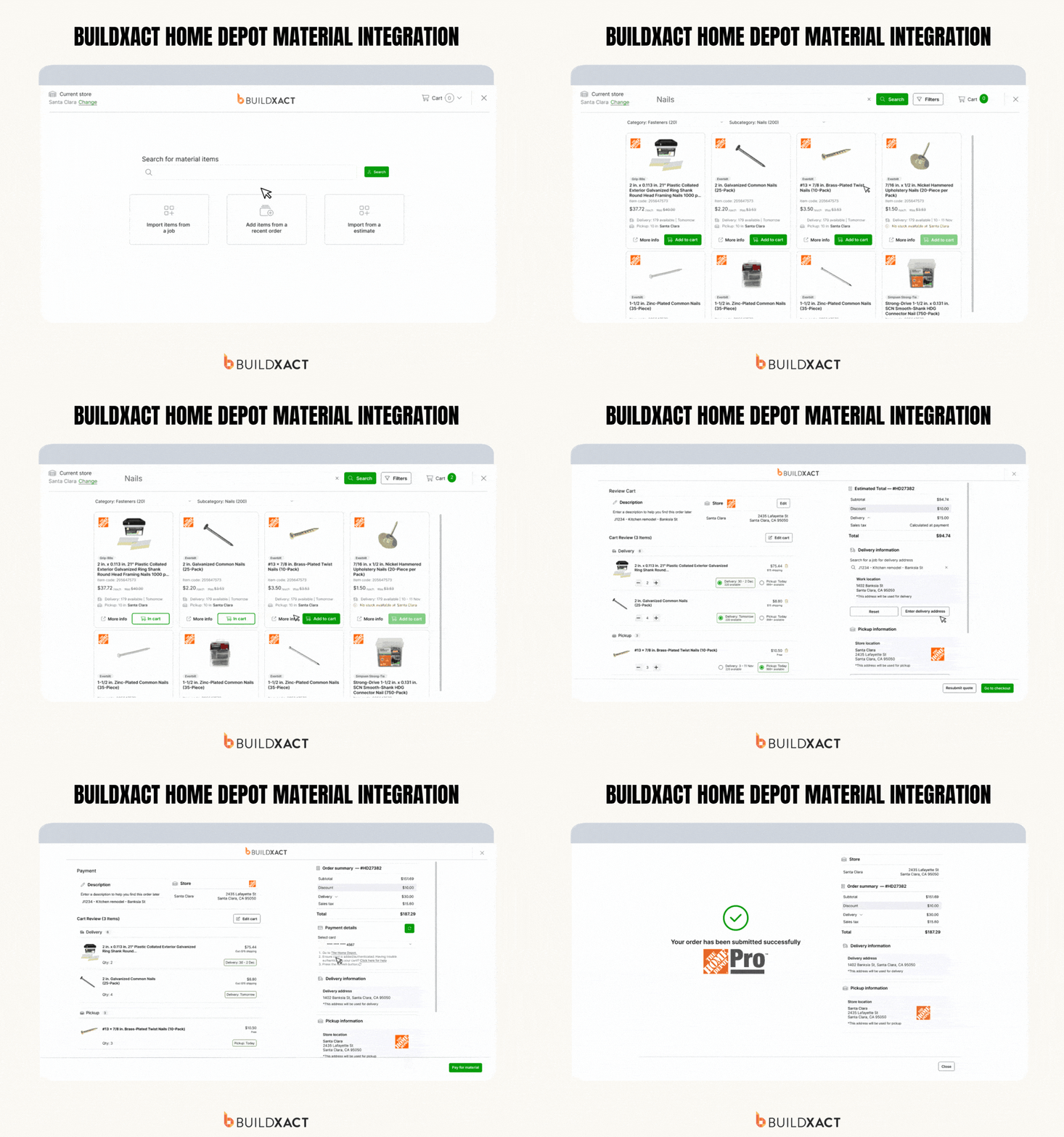
Getting up-to-date material prices can take longer than the rest of the estimate. It often means calling or emailing multiple dealers, waiting for a response and then following up again if you don’t hear back. By the time you have all the quotes, some of the prices may already be outdated.
Joshua Bradley from BradWay Construction and Restoration knows this problem well. He says getting prices from multiple vendors often meant receiving quotes “weeks apart, days apart.” With Buildxact’s connected pricing, those prices can load into an estimate “in a couple of seconds.”
Buildxact integrates with The Home Depot, so you can pull current catalog pricing directly into your estimate. Once you connect your local store, you can search for materials, add them to your estimate and load the latest prices on request, including any eligible Pro Xtra discounts.
This saves you from chasing prices for every new bid. It also makes it easier to keep estimates accurate when material costs change between quoting a job and ordering supplies.
And that’s important for your margin. If you quoted a bathroom remodel three weeks ago and material costs have since increased, you could end up paying the difference yourself.
Before sending an estimate, especially one you’ve been working on for a while, refresh your material prices to make sure they’re still current. Check the homeowner’s selections, labor rates and subcontractor quotes too, particularly if the scope or project timeline has changed.
Why Is the Fastest Estimate the One You Don’t Rebuild?
Think about how many times you’ve priced the same type of job. The dimensions and finishes might change, but much of the work stays the same. Yet if you’re starting from a blank spreadsheet every time, you’re entering materials, labor costs and quantities you’ve already worked out before.
Buildxact lets you save assemblies, create estimating templates and copy items from previous projects, so you don’t have to rebuild everything for the next bid.
For example, you could create an exterior wall assembly that includes studs, drywall, insulation, sheathing, siding and labor. When you estimate another job, you can reuse that assembly and scale it by linear feet rather than calculating each material and labor item separately.
That’s how John Beiler of Northwoods Construction cut his whole-house estimating time from 10 hours to four. By creating wall assemblies and scaling them during takeoff, he could price jobs without repeatedly building the same material lists.
Joe Dodson of Dodson Construction has seen similar benefits from copying items from previous projects, saying it “has just been huge” for his estimating workflow.
Start by saving an assembly for something you estimate regularly, such as an exterior wall or bathroom. On your next bid, reuse it and adjust the measurements, materials and prices to suit the job.
How Much Faster Is Estimating Software, Really?
Buildxact customers have reported some significant improvements, from getting material prices in seconds to cutting several hours off a complete estimate.
Here’s how the numbers compare:
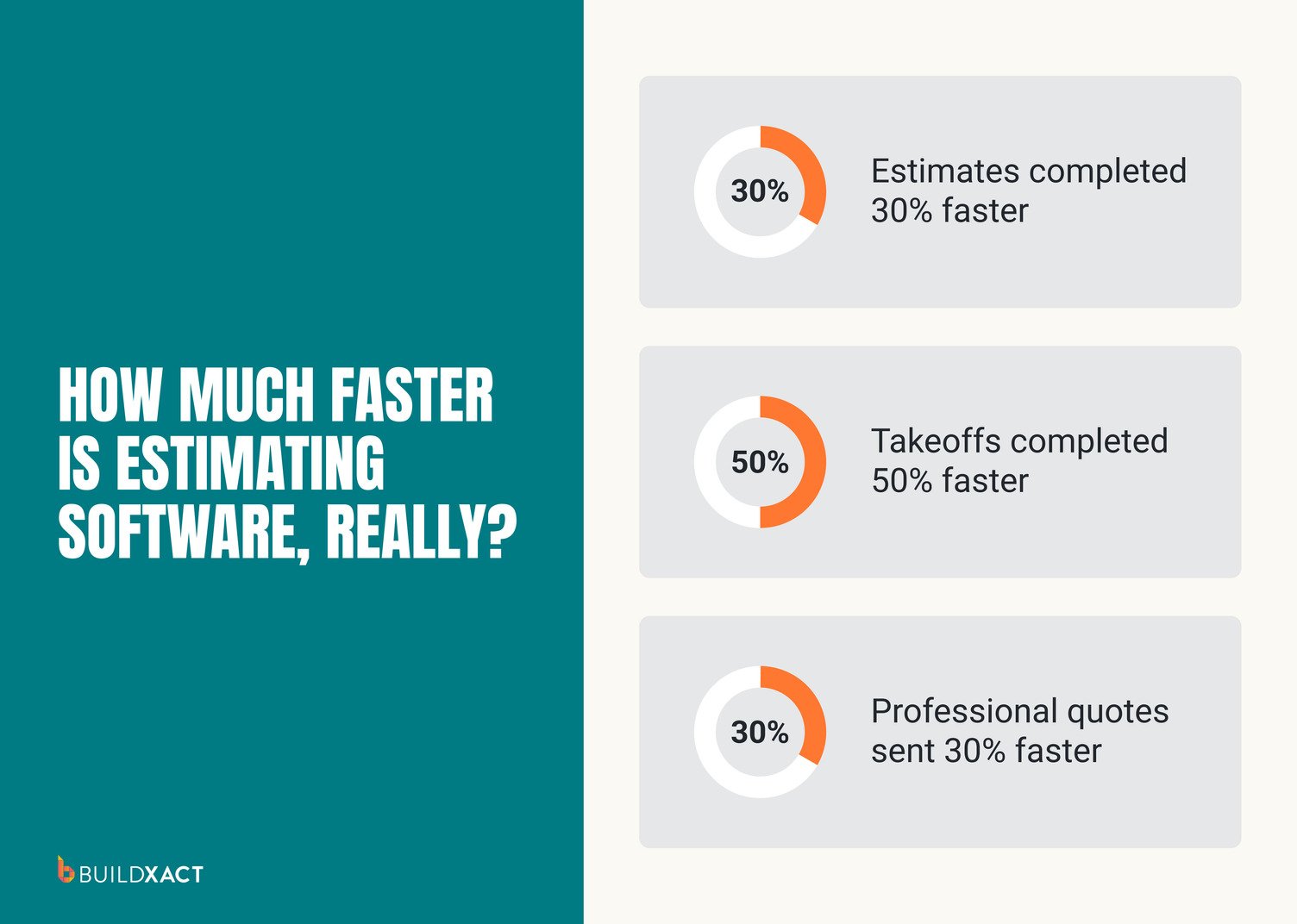
These are Buildxact-reported figures and individual customer results, so your savings will depend on the jobs you estimate and your current process.
Save two hours on each of five bids, and that’s 10 hours back in your week. You can rather spend that time running your business instead of working through another spreadsheet at night.
Faster Bids, Same Margin: Put Blu to Work on Your Next Estimate
With Buildxact, you can get an estimate together faster without cutting corners on accuracy. Blu handles much of the initial work, while you stay in control of the final number.
Before sending a bid, check that the scope is complete, the quantities are accurate and the material prices are current. Make sure you’ve accounted for overhead, contingency and markup so the job can deliver your target profit margin.
For your next job, try estimating it in Buildxact alongside your usual method. See how much time you save and whether the final numbers stack up.
Ready to give it a try? Book a Buildxact demo to see Blu in action, or get started for free.
FAQ
Can ChatGPT do construction estimates?
ChatGPT can help organize project details and draft basic estimates, but it can’t verify site conditions, measurements or current material prices. Dedicated construction estimating software is better suited to producing accurate bids.
Can you review and edit an estimate created with construction software?
Yes. Buildxact lets you adjust materials, quantities, labor and pricing. Blu’s Estimate Reviewer can also flag potentially missed items before you send the bid.
What is the best software for estimating construction costs?
For residential builders, Buildxact is a strong option. It combines AI-assisted estimating, digital takeoffs, current material pricing and reusable templates in one platform.
Does Buildxact Blu work with existing construction plans?
Yes. Upload your PDF plans, and Blu Takeoff Assistant can automatically detect scales, name pages and measure room areas. You can review and adjust the measurements as needed.
Can Buildxact automatically update material prices in an estimate?
Yes. Buildxact integrates with The Home Depot, allowing you to refresh material prices in your estimate on request, including eligible Pro Xtra discounts.