

Construction software runs from about $50 a month for entry tools to $2,000-plus for enterprise platforms. Most growing residential builders and remodelers land between $150 and $500 a month.
The cheapest construction software plan can look like the obvious choice when you’re starting out. But as you bring on more people, bid on more jobs, or need better control over costs and schedules, that plan may stop fitting the way you work.
You don’t want to be paying more than you need to now, only to find yourself switching tools or facing unexpected costs a year down the line.
This guide gives you the lowdown on construction software costs in 2026, how pricing can change as your business grows, and which extra fees to factor into your budget. It also shows where Buildxact fits, with plans starting at $199 per month for unlimited users and no setup fee.
Key Takeaways
- Construction software costs range from about $50 to $2,000-plus per month; most small builders and remodelers pay $150 to $500.
- Four pricing models drive your real cost: per-user, flat-rate, revenue-based (construction volume), and tiered feature pricing.
- Per-user and construction-volume pricing scale up fast as your team or job pipeline grows; flat-rate stays predictable.
- Onboarding and implementation fees are the most underestimated line items and can run into five figures at some vendors.
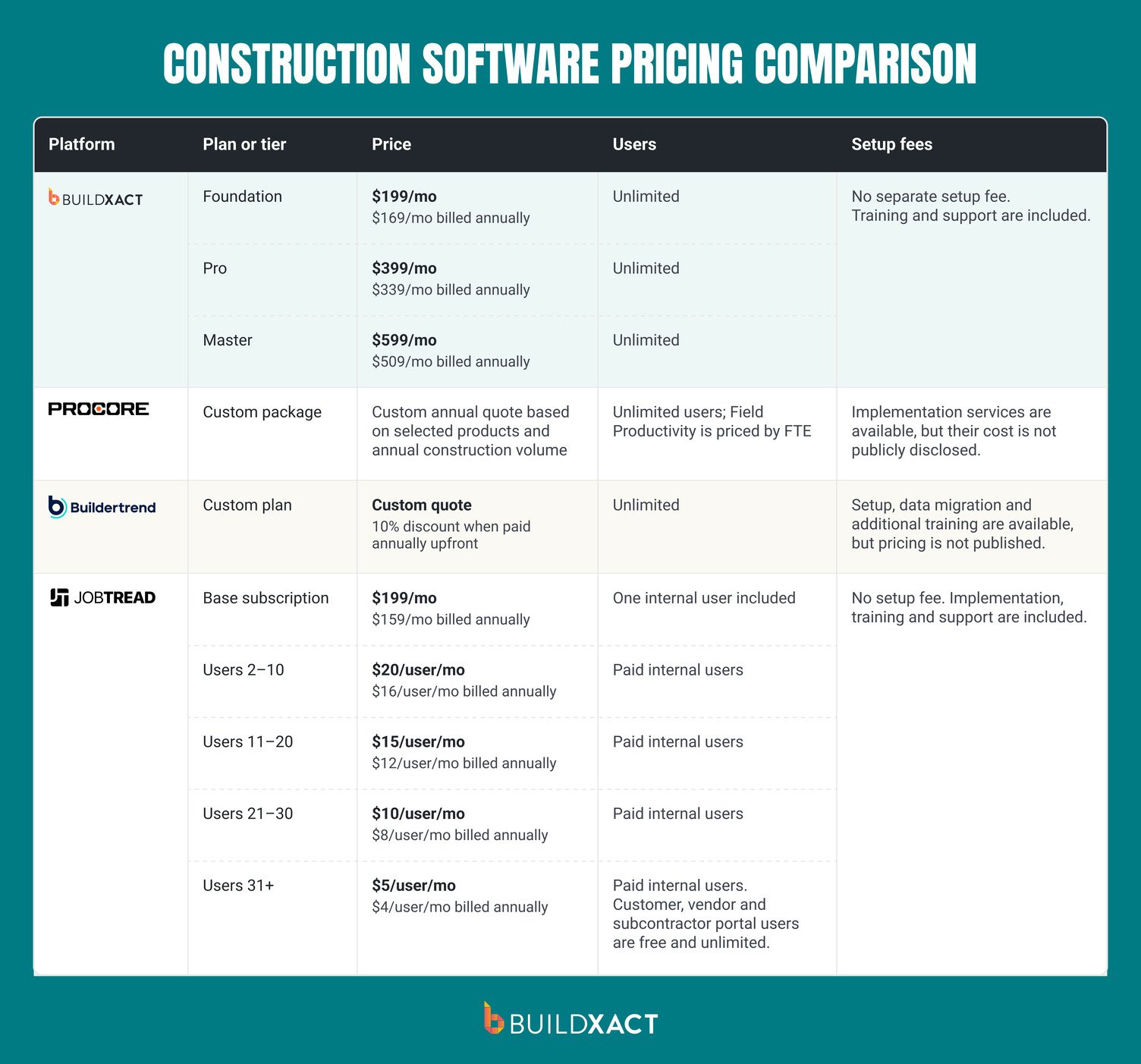
- Buildxact’s monthly plans cost $199 for Foundation, $399 for Pro and $599 for Master. Every plan includes unlimited users, training and support.
How Much Does Construction Software Cost?
Construction software can cost anywhere from about $50 to more than $2,000 a month. If you run a small but growing residential building business, budget around $150 to $500 a month for construction management software that covers estimating, scheduling, project management or a mix of them.
What you’ll pay depends mainly on the pricing model and how many people on your team need access.
As a rough guide:
- Entry-level or single-purpose tools: If you only need help with one task, such as takeoffs or basic project tracking, expect to spend around $50 to $150 a month.
- Estimating and takeoff software: Plans can range from about $50 to several hundred dollars a month, depending on the features and how many people need access.
- Residential construction management platforms: Budget roughly $150 to $500 a month, depending on what’s included and how the plan charges for your team.
- Enterprise systems: If you run larger or more complex projects, costs can reach $2,000 or more a month. You’ll often need a custom quote.
These are starting points, not like-for-like prices. One plan might cover estimating but not scheduling. Another might include access for your whole team. With a per-user plan, the cost can rise as more people need access.
Buildxact’s Foundation plan gives you a clear price point: $199 a month, or $169 a month with annual billing. Every plan includes unlimited users, with job management and scheduling available on higher tiers.
What Are the Main Construction Software Pricing Models?
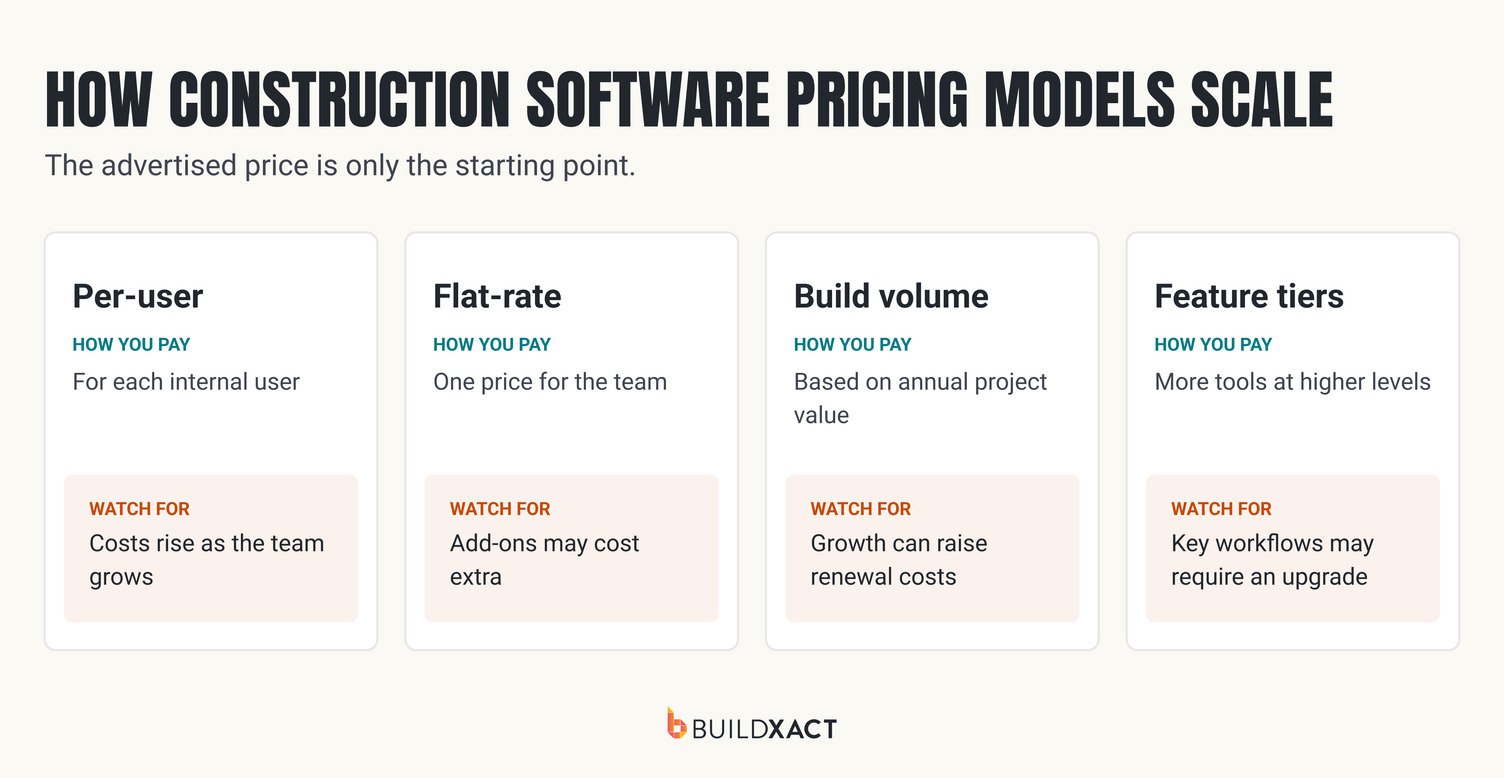
The monthly price tells you what you’ll pay now. The pricing model shows how that bill could change as you add people, take on more work or need more features.
- Per-user pricing: You pay a base fee, a fee for each user, or both. This can suit a small team, but the cost can climb when your estimator, project manager, office administrator and field crew all need access. Check whether subcontractors count as users or whether subcontractor management tools cost extra.
- Flat-rate pricing: You pay one price for the team, so adding employees doesn’t automatically increase the bill. This can make costs easier to forecast, but check for limits on projects, features or storage.
- Revenue-based pricing: Your fee is tied to your annual construction volume. This model is common with larger platforms. If your project pipeline grows, check whether you’ll pay more at renewal.
- Tiered feature pricing: You choose a plan based on the tools you need. You might have to move up a tier to get scheduling, job costing, change orders, and integrations, or pay extra to add AI estimating features.
Say your team has an owner, an estimator, a project manager, an office administrator, and a field crew. If you add two employees, a per-user plan may cost more; a flat-rate plan may not.
If your construction volume grows, a revenue-based fee could rise. And if you need scheduling or job costing, you may need a higher tier. Additional estimating features can also come with an add-on charge.
Buildxact combines flat-rate pricing with feature tiers. Its plans include unlimited users, so adding employees doesn’t increase the per-seat bill. But upgrading your plan or adding AI tools can still raise your monthly cost.
What Do the Top Platforms Actually Cost in 2026?
How Do Construction Software Costs Change as Your Business Grows?
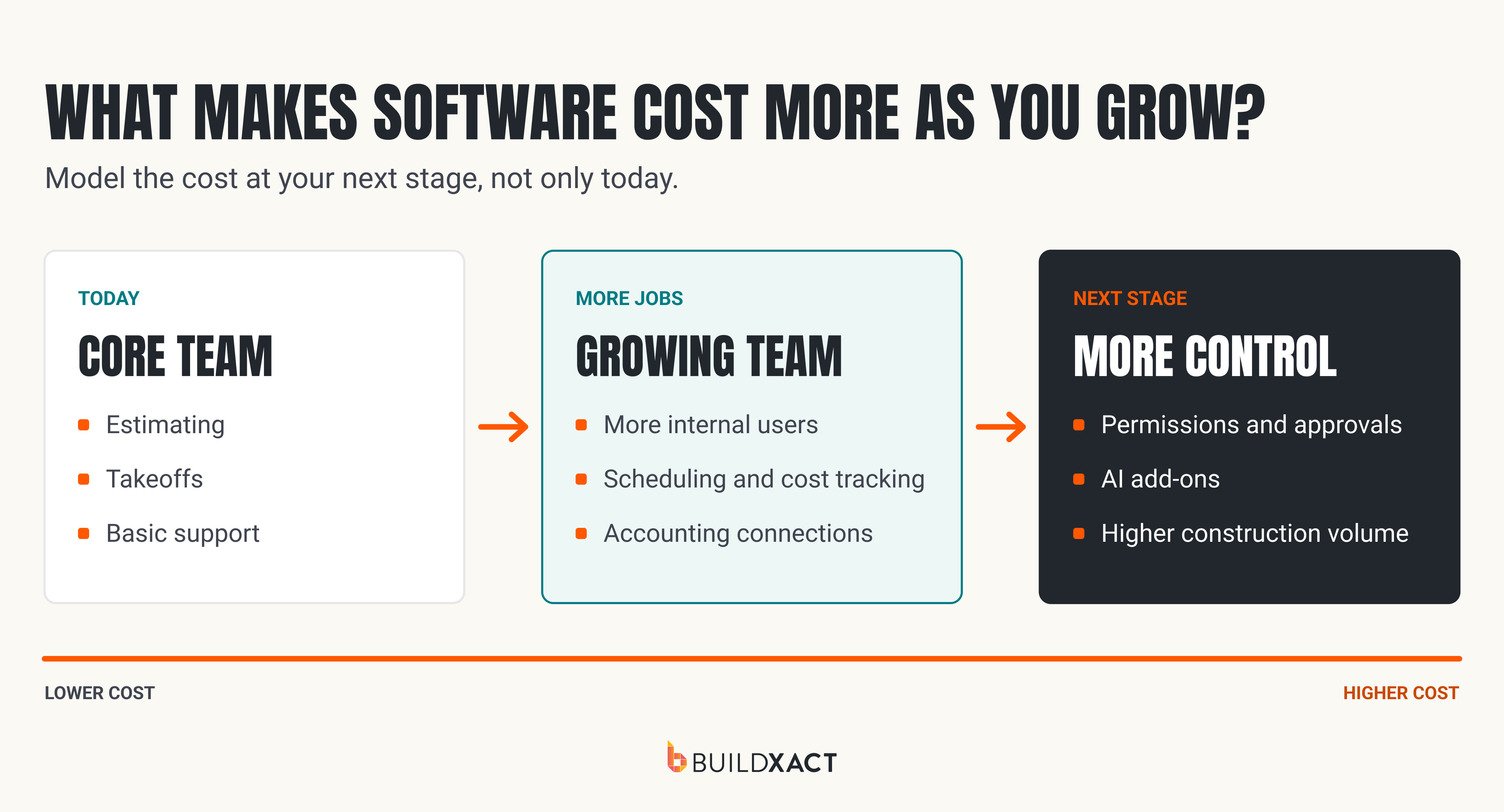
A plan that fits your business today may cost more once you add staff, take on more work or need advanced tools. Before you choose, estimate what you’ll need over the next year or two, not just what you need right now.
Check how these changes could affect your bill:
- More people need access: Ask whether you pay for every office and field user, and whether subcontractors or clients count. Check what access controls your plan includes, and whether your field crew can use the mobile app at no extra cost.
- You take on more work: If pricing is tied to annual construction volume, find out whether a busier year could push you into a higher price bracket or affect your renewal.
- Your workflows expand: Scheduling, job costing and integrations with your accounting tools may sit in higher tiers or cost extra. List the features you expect to need so you can compare the right plans.
- You add estimating or AI tools: Check whether they’re included or sold as monthly add-ons, and whether you can add them only when you need them.
- You need more help: Confirm what training and support include, and whether onboarding or priority support costs extra. Compare monthly billing with annual billing, too, and check the commitment behind any discount.
Buildxact includes training and support with its plans, and offers a 15% discount for annual billing with a 12-month commitment. Buildxact’s AI Construction Assistant, Blu, is available as a paid add-on on some plans, so factor it into your budget if you plan to use it.
Although this AI tool may add to your monthly costs, Blu could pay for itself in time saved. It can scale and measure plans, turn a simple project description into an editable line-item estimate, and flag potential missed costs. Residential builders using Blu have bid on projects up to 7x faster and cut measuring and counting time by 65%.
What Hidden Costs Should You Watch For?
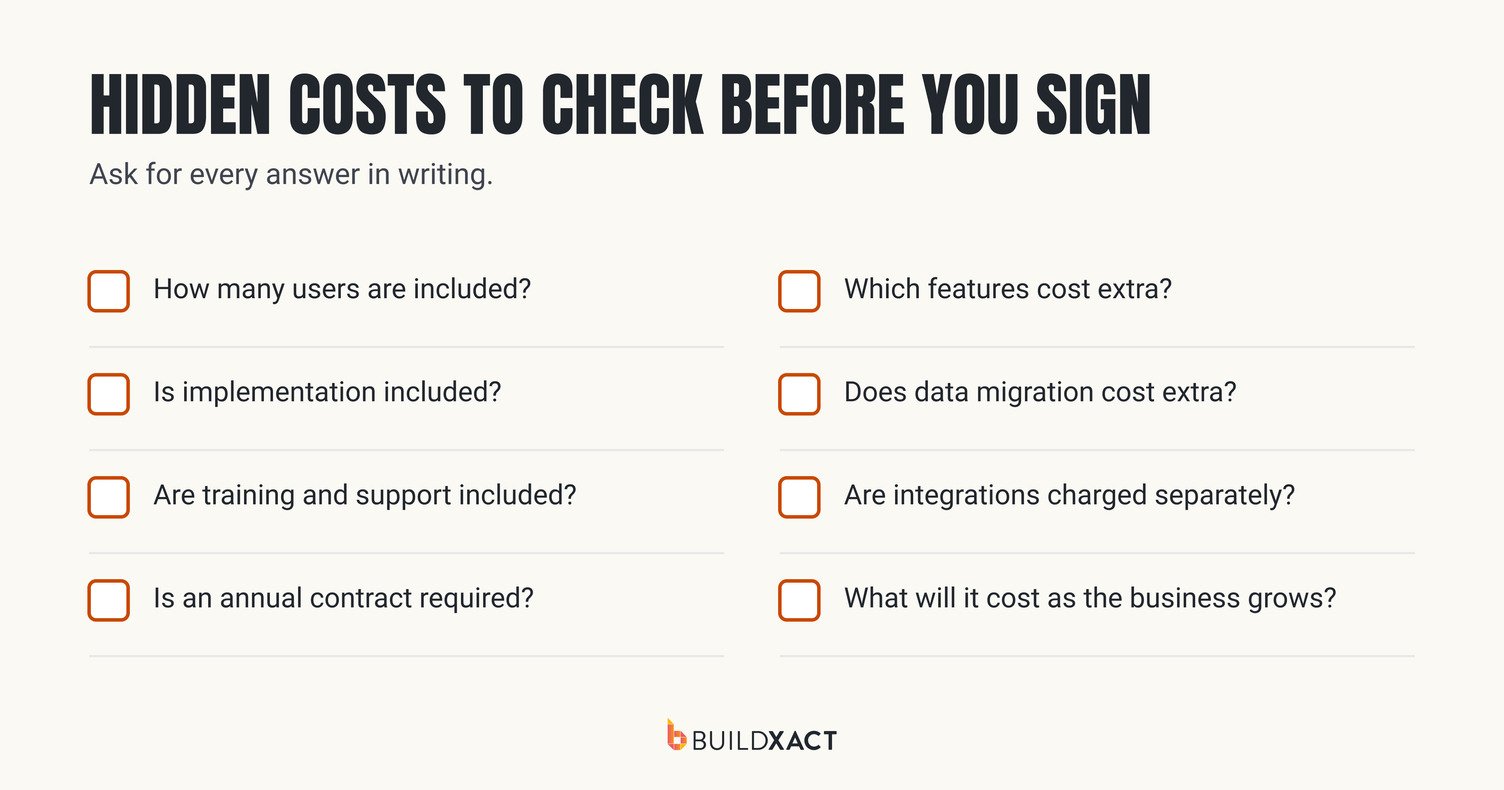
The monthly subscription may not be your full software budget. Before signing, ask what you’ll pay to get the system ready and keep it connected to the tools you already use.
Check for:
- Implementation and onboarding: Ask whether setup, data migration and training are included, or billed separately. Training and resource constraints are important factors to plan for when budgeting a software rollout.
- Paid add-ons: Get the monthly price for any extra estimating, AI, reporting or job management features you expect to use.
- Integration fees: Check whether connecting your construction accounting software or other tools costs extra, and whether there are limits on the integration.
- Support costs: Confirm what support and training you get with the plan, and whether priority help has an additional charge.
The Construction Financial Management Association (CFMA) highlights implementation as a technology cost that’s easy to underestimate. Data migration, integrations, testing and training all take time.
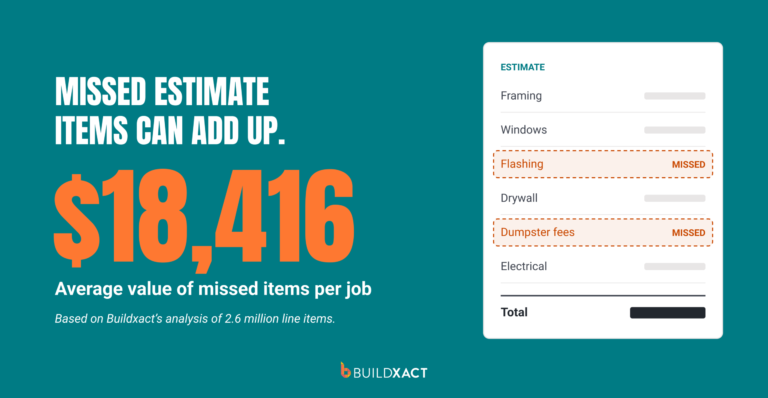
For example, if you migrate outdated material prices or incomplete cost codes, your estimates can be wrong from day one, leaving you to absorb the difference when actual costs come in higher. If your accounting integration isn’t set up properly, your team may also end up re-entering invoices and job costs manually, adding admin time and creating more opportunities for errors.
Those errors and extra admin hours come straight out of the margin you expected to make on the job. With Buildxact, you won’t be left to figure it all out alone. Every paid plan includes training and support, helping your team get up to speed without another support add-on to budget for.
Is Construction Software Worth the Cost for a Residential Builder?
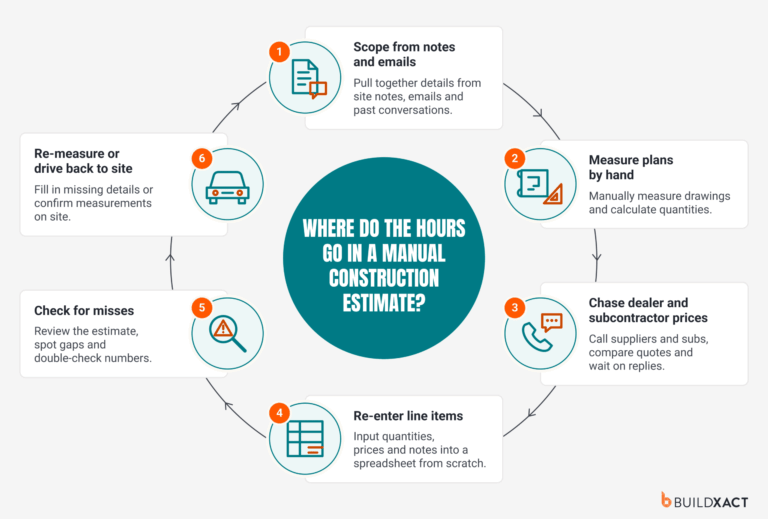
It can be, if the software gives you back enough time or helps you price jobs more accurately. Think about how long you spend measuring plans, building estimates and checking costs. If software cuts that time, you can put it toward getting more bids out, keeping current jobs moving or finding the next one.
John Beiler of Northwoods Construction said a whole-house estimate that used to take him 10 hours took four with Buildxact. That saved him six hours on one estimate, time he could use to grow his business. Your results will depend on your workflow, but it’s a useful example of what faster estimating can free up.
Before you commit, compare the subscription with the time you expect to save and the cost of errors or missed items. Buildxact offers a 14-day free trial, so you can test it with your own plans and estimates before deciding whether the price makes sense for your business.
Invest in Software That Protects Your Profit
When you’re pricing bids, coordinating subcontractors and tracking job costs, admin can crowd out the work that keeps projects profitable. Buildxact’s benchmark estimates builders can save 16 hours a month on admin. That’s time you could put toward getting bids out sooner, checking costs or keeping the next job moving.
Before you commit, check how the price changes as your business grows, who gets access and whether setup costs extra. Then weigh the full cost against the time you expect to get back.
You shouldn’t have to book a sales call just to find out what software costs. Buildxact publishes its prices, includes unlimited users and charges no setup fee. Compare Buildxact plans or start for free to see how it fits your business.
FAQ
Is annual or monthly construction software pricing better for a growing builder?
Annual billing can lower your monthly cost, but check the commitment before choosing it. Buildxact’s annual plans are 15% cheaper than monthly plans and require a 12-month commitment. If your team or workflow is still changing, monthly billing may give you more flexibility.
How should a builder calculate construction software ROI?
Compare the full software cost with the value of the time and money it could save. Estimate the hours saved on takeoffs, bids and admin, then multiply that by your labor cost. Add any savings from fewer estimating errors or missed costs. Include setup, add-ons and extra user fees in the software cost.
What costs should be included beyond the monthly subscription?
Ask about setup and onboarding, data migration, training, add-on features, integrations, extra users and customer support. Check for contract terms, renewal pricing and any taxes or fees, too. Get the full first-year cost in writing before you commit.
Is an all-in-one platform cheaper than using separate tools?
Not always. Separate tools may have lower subscription prices, but add up the cost of extra users, integrations and staff time spent moving information between them. Compare the full annual cost and check whether your estimating, project scheduling and job-costing workflows connect.
Can I start with estimating software and add project management later?
Yes, but check what it costs to upgrade and whether your estimates, templates and job data carry over. If you expect to need scheduling or job costing soon, compare the price of that plan now so you can budget for the next stage of your business.
Want to jump right in? Start your free trial now.